Join us at FabCon Atlanta from March 16 - 20, 2026, for the ultimate Fabric, Power BI, AI and SQL community-led event. Save $200 with code FABCOMM.
Register now!The Power BI Data Visualization World Championships is back! Get ahead of the game and start preparing now! Learn more
best regard
I am bringing a query from SQL Server and in the table I have a field called quantity, it is numeric and there are rows with 0; I want the information upload without 0, how was the upload done? Thank you.
I found the command Table.SelectRows but it does not work correctly, I do it from query editor and write the command does not work
#"Filtered Rows" = Table.SelectRows(
t_datos_ventas,
each [cantidad] = 0
)
Solved! Go to Solution.
I already found the solution. Thank you
let
Source = Sql.Database("x.x.x.x", "db_datos_ejemplo", [Query="select *#(lf)from t_datos#(lf)where cantidad<>0"])
in
Source
Hi @jjosorio ,
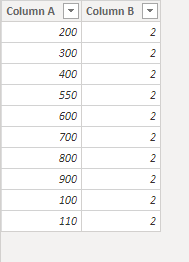
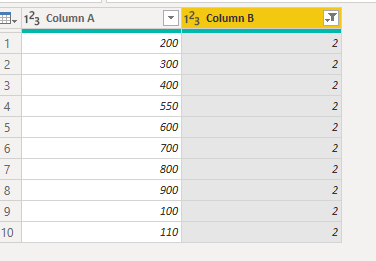
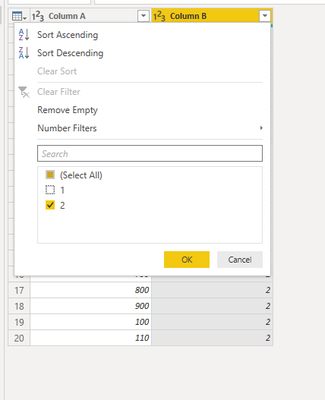
In Power Query, you simply filter and uncheck the zero. In my example I unchecked the 1 and ended up only with 2s. The great thing is when you refresh, it remembers yours steps and filters. Start from the bottom of the pictures and end up with the top which is the table in Power BI.
Let me know if you have any questions.
If this solves your issues, please mark it as the solution, so that others can find it easily. Kudos are nice too.
Nathaniel
those rows.
Proud to be a Super User!
Thank you very much for your response, but what I want to do is before the data reaches PowerBi filter by 0, that way the data arrives clean
In Advanced Editor I am thinking of excluding them, but I would not know how or if they have any other way I thank you
let
Source = Sql.Database("x.x.x.x", "db_ejemplo"),
dbo_t_datos = Source{[Schema="dbo",Item="t_datos"]}[Data]
in
dbo_t_datos_
)Source = Sql.Database("x.x.x.x", "db_datos_ejemplo"),
dbo_t_datos = Source{[Schema="dbo",Item="t_datos_"]}[Data]
in
dbo_t_datos_ejemplo
I already found the solution. Thank you
let
Source = Sql.Database("x.x.x.x", "db_datos_ejemplo", [Query="select *#(lf)from t_datos#(lf)where cantidad<>0"])
in
Source
Check out the November 2025 Power BI update to learn about new features.
Advance your Data & AI career with 50 days of live learning, contests, hands-on challenges, study groups & certifications and more!
| User | Count |
|---|---|
| 20 | |
| 10 | |
| 9 | |
| 4 | |
| 4 |
| User | Count |
|---|---|
| 34 | |
| 31 | |
| 19 | |
| 12 | |
| 10 |