Don't miss your chance to take the Fabric Data Engineer (DP-700) exam on us!
Learn moreNext up in the FabCon + SQLCon recap series: The roadmap for Microsoft SQL and Maximizing Developer experiences in Fabric. All sessions are available on-demand after the live show. Register now
I'm struggling with a couple of problems in the same project and I'll post two different help request.
You can find the Problem 1 in this post: https://community.powerbi.com/t5/DAX-Commands-and-Tips/How-to-filter-a-page-with-different-attribute...
Problem 2.
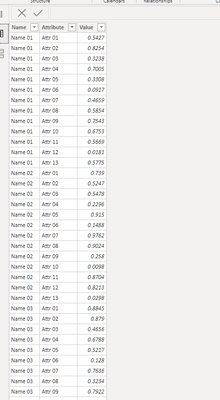
I have a table with more than 80 Attributes, like this:
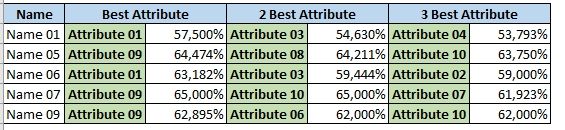
I want to create a page with a view that shows the largest three attributes for each name, like this:
I would really appreciate any help.
Thank you
I still can't find a way to unpivot my Attributes Table.
I can't do it in power query, because it is a calculated table, created using the following DAX code:
AttributesTable =
var filteredTable = FILTER('InputTable', 'InputTable'[Exclude] = "NO")
return SELECTCOLUMNS(filteredTable,
"Name", 'InputTable'[Name]
)
Then, all the more than 80 attributes have been added as calculated columns using DAX code.
Please, any help?
Thank you
think you can use generate instead of addcolumns
firstly, you need to unpivot your data like this
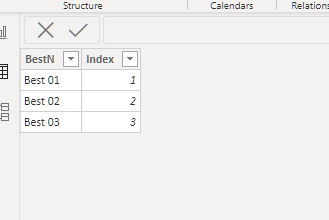
then add a dimension table like this
then create two measures
Attr = CALCULATE(MAX('Table'[Attribute]),FILTER(VALUES('Table'[Attribute]),RANKX(ALL('Table'[Attribute]),CALCULATE(MAX('Table'[Value])))=MAX('TopN'[Index])))
Val = CALCULATE(MAX('Table'[Value]),FILTER(VALUES('Table'[Attribute]),RANKX(ALL('Table'[Attribute]),CALCULATE(MAX('Table'[Value])))=MAX('TopN'[Index])))
then show the view you want
My Data Table is a calculated table where I added all the Attributes columns using formulas. How can I unpivot the table?
If you have recently started exploring Fabric, we'd love to hear how it's going. Your feedback can help with product improvements.
A new Power BI DataViz World Championship is coming this June! Don't miss out on submitting your entry.
Share feedback directly with Fabric product managers, participate in targeted research studies and influence the Fabric roadmap.
| User | Count |
|---|---|
| 9 | |
| 6 | |
| 3 | |
| 2 | |
| 1 |
| User | Count |
|---|---|
| 21 | |
| 14 | |
| 11 | |
| 5 | |
| 5 |