Join us at FabCon Atlanta from March 16 - 20, 2026, for the ultimate Fabric, Power BI, AI and SQL community-led event. Save $200 with code FABCOMM.
Register now!The Power BI Data Visualization World Championships is back! Get ahead of the game and start preparing now! Learn more
Hi,
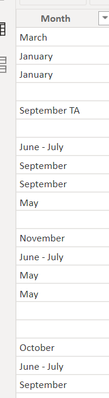
I would like to count row that contain month January, then feb and so on. However the data that i have is not structured. Some are January. Some are January- February. Any shortcuts?
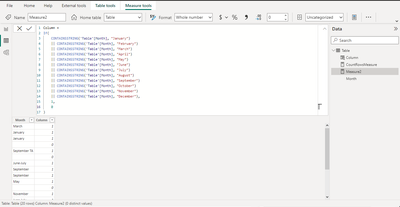
Column =
If(
CONTAINSSTRING('Table'[Month], "January")
|| CONTAINSSTRING('Table'[Month], "February")
|| CONTAINSSTRING('Table'[Month], "March")
|| CONTAINSSTRING('Table'[Month], "April")
|| CONTAINSSTRING('Table'[Month], "May")
|| CONTAINSSTRING('Table'[Month], "June")
|| CONTAINSSTRING('Table'[Month], "July")
|| CONTAINSSTRING('Table'[Month], "August")
|| CONTAINSSTRING('Table'[Month], "September")
|| CONTAINSSTRING('Table'[Month], "October")
|| CONTAINSSTRING('Table'[Month], "November")
|| CONTAINSSTRING('Table'[Month], "December"),
1,
0
)
Then create a measure in which you can do 2 things to get the countrows of requirement.
Measure2 = CALCULATE( COUNTROWS('Table'), 'Table'[Column]=1)or
CountRowsMeasure = SUM('Table'[Column])
Thank you.
If my answer helps you, please mark it as solution.
Hi @Nyxza
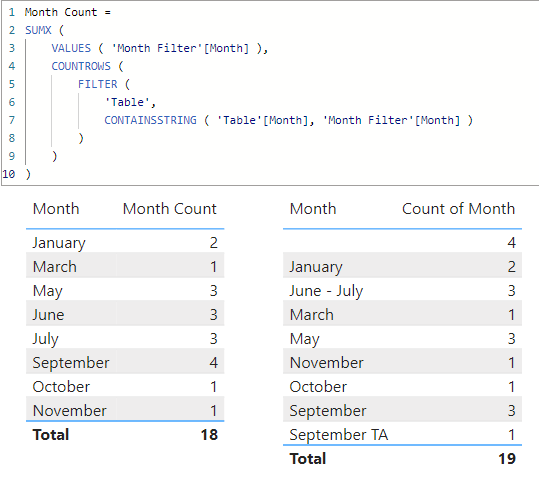
I hope this is what you're looking for
Please refer to attached sample file with the proposed solution
Month Count =
SUMX (
VALUES ( 'Month Filter'[Month] ),
COUNTROWS (
FILTER (
'Table',
CONTAINSSTRING ( 'Table'[Month], 'Month Filter'[Month] )
)
)
)
The Power BI Data Visualization World Championships is back! Get ahead of the game and start preparing now!
Check out the November 2025 Power BI update to learn about new features.
| User | Count |
|---|---|
| 19 | |
| 11 | |
| 9 | |
| 4 | |
| 4 |
| User | Count |
|---|---|
| 35 | |
| 32 | |
| 20 | |
| 12 | |
| 10 |