Join us at FabCon Atlanta from March 16 - 20, 2026, for the ultimate Fabric, Power BI, AI and SQL community-led event. Save $200 with code FABCOMM.
Register now!The Power BI Data Visualization World Championships is back! Get ahead of the game and start preparing now! Learn more
Hi,
I am beginner in Power Bi and I am stuck on this problem...
I would like to calculate the percentage of variation between years per category :
My data are :
| Year | PercentageoftransportInaccidentfortheyear | Transport |
2020 | 15% | A pied |
| 2020 | 0% | A Vélo |
| 2020 | 8% | Autre |
| 2020 | 0% | Moto |
| 2020 | 0% | Transport Public |
| 2020 | 77% | Voiture |
| 2019 | 11% | A Pied |
| 2019 | 3% | A Vélo |
| 2019 | 3% | Autre |
| 2019 | 8% | Moto |
| 2019 | 4% | Transport Public |
| 2019 | 70% | Voiture |
| 2018 | 10% | A Pied |
| 2018 | 1% | A Vélo |
| 2018 | 1% | Autre |
| 2018 | 9% | Moto |
| 2018 | 0% | Transport Public |
| 2018 | 79% | Voiture |
I would like to see the variation between 2 years per category, for example :
| Transport | Year N-1 | Year N | Trend | % variation |
| Voiture | 70% | 77% | up | +7% |
| A Vélo | 3% | 0% | down | -3% |
| Autre | 3% | 8% | up | +5% |
Thanks a lot for your help, AnneSo
Hello @Anonymous ,
I have noticed that you have kudoed my response but not accepted it as a solution. Is there anything missing which can help in marking this post as a solution?
Cheers!
Vivek
Blog: vivran.in/my-blog
Connect on LinkedIn
Follow on Twitter
Hello @Anonymous ,
You may use the following measures:
Avg Accident = AVERAGE(dtTable[Percentage])
% Transport Accident PY =
VAR _PrevYear =
MAX(dtTable[Year])-1
VAR _PrevAvg =
CALCULATE(
[Avg Accident],
FILTER(
dtTable,
dtTable[Year] = _PrevYear
)
)
RETURN
_PrevAvg
% Transport Accident CY =
VAR _CurrentYear =
MAX(dtTable[Year])
VAR _CurrentAvg =
CALCULATE(
[Avg Accident],
FILTER(
dtTable,
dtTable[Year] = _CurrentYear
)
)
RETURN
_CurrentAvg
Trend =
IF(
[% Transport Accident CY] > [% Transport Accident PY],
"Up",
"Down"
)
% Diff = [% Transport Accident CY] - [% Transport Accident PY]
Following is the result:
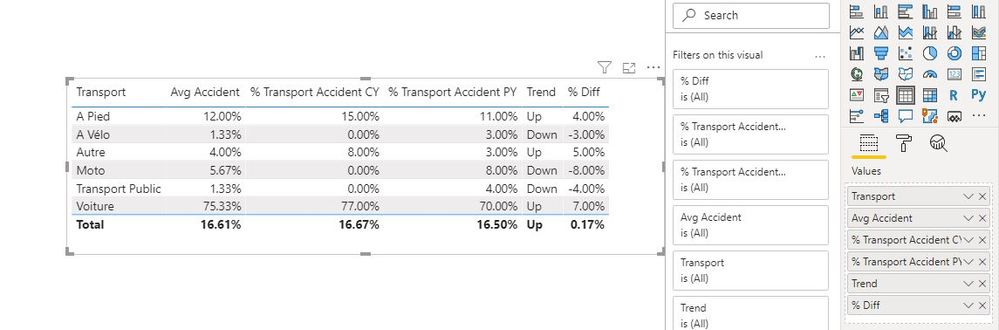
Cheers!
Vivek
If it helps, please mark it as a solution. Kudos would be a cherry on the top 🙂
If it doesn't, then please share a sample data along with the expected results (preferably an excel file and not an image)
Feel free to email me for any BI needs.
Blog: vivran.in/my-blog
Connect on LinkedIn
Follow on Twitter
The Power BI Data Visualization World Championships is back! Get ahead of the game and start preparing now!
Check out the November 2025 Power BI update to learn about new features.
| User | Count |
|---|---|
| 19 | |
| 11 | |
| 9 | |
| 4 | |
| 4 |
| User | Count |
|---|---|
| 35 | |
| 32 | |
| 20 | |
| 12 | |
| 10 |