cancel
Showing results for 
Search instead for 
Did you mean: 

The Power BI Data Visualization World Championships is back! Get ahead of the game and start preparing now! Learn more

Reply
Anonymous
Not applicable

Help with DAX function LEFT and a dynamic number of characters

I have a column named BinMax which format is text. I'd like to create a calculated column extracting all but the last two chracters of this string. Say, for BinMax="212", I'd like to get "2" as a return. For "1212", I'd like to get "12".

I tried:

LEFT(
[BinMax]
LEN([BinMax] - 2)
)


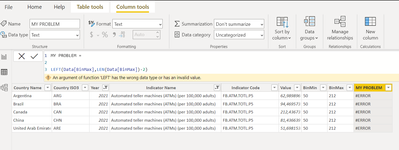
but got error:

ERROR.png


When I try LEN([BinMax] - 1) it works.


What seemed so simple has already taken me hours trying to solve it. What am I missing here?

1 ACCEPTED SOLUTION
tamerj1
Super User
Super User

Hi @Anonymous 

please try

NewColumn =
IFERROR ( LEFT ( [BinMax], LEN ( [BinMax] - 2 ) ), BLANK () ) 
then filter for the blanks to see which rows are causing the error 

View solution in original post

2 REPLIES 2
Anonymous
Not applicable

Thanks @tamerj1 , I had zeros in the column, so LEN of any string - 2 equals negative, which results in error. Thanks for opening my eyes to the other rows in the column 🙂

tamerj1
Super User
Super User

Hi @Anonymous 

please try

NewColumn =
IFERROR ( LEFT ( [BinMax], LEN ( [BinMax] - 2 ) ), BLANK () ) 
then filter for the blanks to see which rows are causing the error 

Helpful resources

Announcements
Power BI DataViz World Championships

Power BI Dataviz World Championships

The Power BI Data Visualization World Championships is back! Get ahead of the game and start preparing now!

December 2025 Power BI Update Carousel

Power BI Monthly Update - December 2025

Check out the December 2025 Power BI Holiday Recap!

FabCon Atlanta 2026 carousel

FabCon Atlanta 2026

Join us at FabCon Atlanta, March 16-20, for the ultimate Fabric, Power BI, AI and SQL community-led event. Save $200 with code FABCOMM.