cancel
Showing results for 
Search instead for 
Did you mean: 

The Power BI Data Visualization World Championships is back! Get ahead of the game and start preparing now! Learn more

Reply
Anonymous
Not applicable

Help with DAX function LEFT and a dynamic number of characters

I have a column named BinMax which format is text. I'd like to create a calculated column extracting all but the last two chracters of this string. Say, for BinMax="212", I'd like to get "2" as a return. For "1212", I'd like to get "12".

I tried:

LEFT(
[BinMax]
LEN([BinMax] - 2)
)


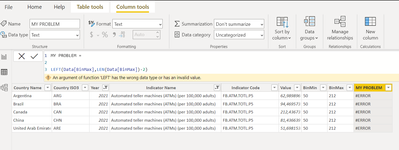
but got error:

ERROR.png


When I try LEN([BinMax] - 1) it works.


What seemed so simple has already taken me hours trying to solve it. What am I missing here?

1 ACCEPTED SOLUTION
tamerj1
Super User
Super User

Hi @Anonymous 

please try

NewColumn =
IFERROR ( LEFT ( [BinMax], LEN ( [BinMax] - 2 ) ), BLANK () ) 
then filter for the blanks to see which rows are causing the error 

View solution in original post

2 REPLIES 2
Anonymous
Not applicable

Thanks @tamerj1 , I had zeros in the column, so LEN of any string - 2 equals negative, which results in error. Thanks for opening my eyes to the other rows in the column 🙂

tamerj1
Super User
Super User

Hi @Anonymous 

please try

NewColumn =
IFERROR ( LEFT ( [BinMax], LEN ( [BinMax] - 2 ) ), BLANK () ) 
then filter for the blanks to see which rows are causing the error 

Helpful resources

Announcements
November Power BI Update Carousel

Power BI Monthly Update - November 2025

Check out the November 2025 Power BI update to learn about new features.

Fabric Data Days Carousel

Fabric Data Days

Advance your Data & AI career with 50 days of live learning, contests, hands-on challenges, study groups & certifications and more!

FabCon Atlanta 2026 carousel

FabCon Atlanta 2026

Join us at FabCon Atlanta, March 16-20, for the ultimate Fabric, Power BI, AI and SQL community-led event. Save $200 with code FABCOMM.