Join us at FabCon Atlanta from March 16 - 20, 2026, for the ultimate Fabric, Power BI, AI and SQL community-led event. Save $200 with code FABCOMM.
Register now!The Power BI Data Visualization World Championships is back! It's time to submit your entry. Live now!
I have a Date table with Date, Year and Rank and Catogery table with season_catogery and season _Year.
My request is , when user select Season_Catogery A23, then the result should show (Previos year) 5/28/2022 (Rank 2 )measure output.
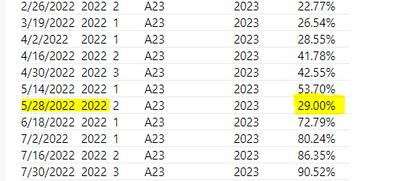
EX: According to below test data I need to see 29% as a result.
| 5/28/2022 | 2022 | 2 | A | 2023 | 29.00% |
Here is the test data.
| Date | Year | Rank | Season_Category | Season_Year | MEASURE |
| B22 | 2023 | 0.00% | |||
| 10/3/2020 | 2020 | 1 | B22 | 2023 | 0.00% |
| 10/17/2020 | 2020 | 2 | B22 | 2023 | 0.00% |
| 10/31/2020 | 2020 | 3 | B22 | 2023 | 0.00% |
| 11/3/2020 | 2020 | 1 | B22 | 2023 | 0.00% |
| 11/14/2020 | 2020 | 2 | B22 | 2023 | 0.00% |
| 12/5/2020 | 2020 | 1 | B22 | 2023 | 0.00% |
| 1/2/2021 | 2021 | 1 | B22 | 2023 | 0.00% |
| 1/16/2021 | 2021 | 2 | B22 | 2023 | 0.00% |
| 1/30/2021 | 2021 | 3 | A23 | 2023 | 0.00% |
| 2/13/2021 | 2021 | 1 | A23 | 2023 | 0.00% |
| 2/27/2021 | 2021 | 2 | A23 | 2023 | 0.00% |
| 3/20/2021 | 2021 | 1 | A23 | 2023 | 0.00% |
| 4/3/2021 | 2021 | 1 | A23 | 2023 | 0.00% |
| 4/17/2021 | 2021 | 2 | A23 | 2023 | 0.00% |
| 5/1/2021 | 2021 | 1 | A23 | 2023 | 0.00% |
| 5/15/2021 | 2021 | 2 | A23 | 2023 | 0.00% |
| 5/29/2021 | 2021 | 3 | A23 | 2023 | 0.00% |
| 6/19/2021 | 2021 | 1 | A23 | 2023 | 0.00% |
| 7/3/2021 | 2021 | 1 | A23 | 2023 | 0.00% |
| 7/17/2021 | 2021 | 2 | A23 | 2023 | 0.00% |
| 7/31/2021 | 2021 | 3 | A23 | 2023 | 0.00% |
| 8/14/2021 | 2021 | 1 | A23 | 2023 | 0.00% |
| 8/28/2021 | 2021 | 2 | A23 | 2023 | 0.00% |
| 9/18/2021 | 2021 | 1 | A23 | 2023 | 0.00% |
| 10/2/2021 | 2021 | 1 | A23 | 2023 | 0.00% |
| 10/19/2021 | 2021 | 2 | A23 | 2023 | 0.00% |
| 10/30/2021 | 2021 | 3 | A23 | 2023 | 0.00% |
| 11/13/2021 | 2021 | 1 | A23 | 2023 | 18.15% |
| 12/4/2021 | 2021 | 1 | A23 | 2023 | 0.00% |
| 1/1/2022 | 2022 | 1 | A23 | 2023 | 0.00% |
| 1/15/2022 | 2022 | 2 | A23 | 2023 | 0.00% |
| 1/29/2022 | 2022 | 3 | A23 | 2023 | 8.77% |
| 2/12/2022 | 2022 | 1 | A23 | 2023 | 22.15% |
| 2/26/2022 | 2022 | 2 | A23 | 2023 | 22.77% |
| 3/19/2022 | 2022 | 1 | A23 | 2023 | 26.54% |
| 4/2/2022 | 2022 | 1 | A23 | 2023 | 28.55% |
| 4/16/2022 | 2022 | 2 | A23 | 2023 | 41.78% |
| 4/30/2022 | 2022 | 3 | A23 | 2023 | 42.55% |
| 5/14/2022 | 2022 | 1 | A23 | 2023 | 53.70% |
| 5/28/2022 | 2022 | 2 | A23 | 2023 | 29.00% |
| 6/18/2022 | 2022 | 1 | A23 | 2023 | 72.79% |
| 7/2/2022 | 2022 | 1 | A23 | 2023 | 80.24% |
| 7/16/2022 | 2022 | 2 | A23 | 2023 | 86.35% |
| 7/30/2022 | 2022 | 3 | A23 | 2023 | 90.52% |
| 8/20/2022 | 2022 | 1 | A23 | 2023 | 92.19% |
| 9/3/2022 | 2022 | 1 | A23 | 2023 | 94.04% |
| 9/17/2022 | 2022 | 2 | A23 | 2023 | 94.35% |
| 10/1/2022 | 2022 | 1 | A23 | 2023 | 94.34% |
Thanks a lot
Hello,
Desired output not clear to me can you please elaborate some more to it.
Thanks!
Ajendra Rawat
Hi ,
When user selects (in slicer)A23, the result should be 29% .
Thank you
Hi @FreemanZ ,
This is my request
when user select Season_Catogery(in slicer) = A23, then the result should show (Previos year) 5/28/2022 (Rank 2 )measure output.
Thank you
Hi @Puja
You have multiple lines show A23, rank2, previous year. Why line 5/28/2022 stand out?
Thts what user want to see.
When the Catogery is selected , like A23, or B22 in slicer, it should pick Previous Year May Rank2 data only.
@Anonymous could you please help. I tried the whole day yesterday, couldnt get it correctly.
Thanks much.
Thanks.
The Power BI Data Visualization World Championships is back! It's time to submit your entry.
Check out the January 2026 Power BI update to learn about new features.
| User | Count |
|---|---|
| 9 | |
| 5 | |
| 5 | |
| 3 | |
| 3 |
| User | Count |
|---|---|
| 19 | |
| 14 | |
| 9 | |
| 8 | |
| 8 |