Don't miss your chance to take the Fabric Data Engineer (DP-700) exam on us!
Learn moreWe've captured the moments from FabCon & SQLCon that everyone is talking about, and we are bringing them to the community, live and on-demand. Starts on April 14th. Register now
Hi Experts,
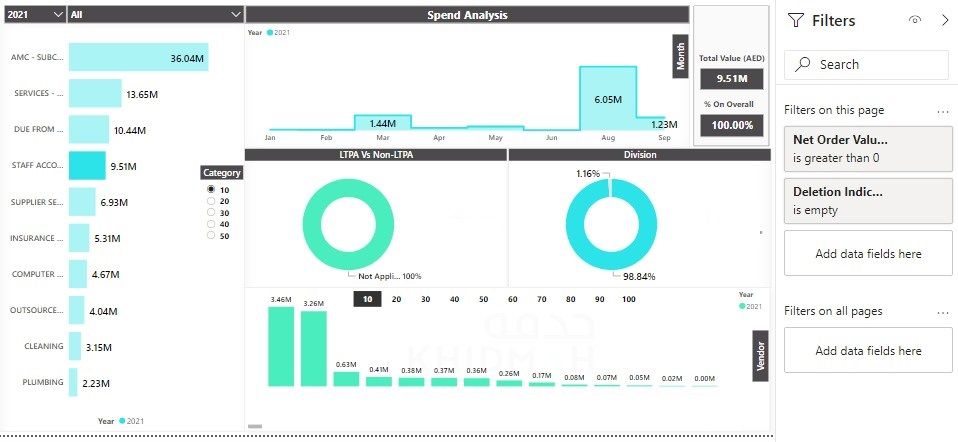
I am looking for a DAX measure to get the percentage on an overall total.
I don't want to change the Overall Total based on clicking on graphs or table in the dashboard - the total should only change based on the filters and slicers.
DAX:
Solved! Go to Solution.
Got it finally.
3. % On Overall = DIVIDE(PRs_POs[Sum based on selection],[Overall Total Based On Filters & Slicers])
Got it finally.
3. % On Overall = DIVIDE(PRs_POs[Sum based on selection],[Overall Total Based On Filters & Slicers])
Hi,
According to your description, I think you are talking about the “Edit interaction” function in the Power BI desktop. I suggest you to click on the card visual that displays the total value in the card chart then select “Edit interaction” on the above then set other visuals’ interaction types to “None” like this:
For more info, please refer to this official document:
https://docs.microsoft.com/en-us/power-bi/create-reports/service-reports-visual-interactions
Thank you very much!
Best Regards,
Community Support Team _Robert Qin
If this post helps, then please consider Accept it as the solution to help the other members find it more quickly.
Not exactly.
My requirement is simple.
I have a total (Card) based on selection, which is fine.
I need to show the mgt. what is the % on overall based on selection/slicing the data.
For. e.g. If I am selecting year 2021 in slicer, the total amout is 15M, now if I select a particular vendor (on graph) or a category, the total amount changes - which is fine. Say, I have selected a category 'AMC' and the amount is 3M, I want to show 3/15 which is 20%.
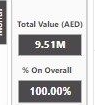
Here in my formula it shows 100% except for Month graph, if I select a month on a graph, it shows the correct percentage.
Any luck to get a solution?
@shareezsaleem , Try like, if that can help
Overall Total = CALCULATE(SUM(PRs_POs[Net Order Value (AED)]),allselected(PRs_POs) )
No, its not working, it slice the figure whenever I click on a bar or anything on the chart.
I need to show this value as the total.
When I used the below measure, it doesn't slice the amount on month selection but for other like vendor, category, plant name, LTPA it's slices the figure. Can I please have a solution?
If you have recently started exploring Fabric, we'd love to hear how it's going. Your feedback can help with product improvements.
A new Power BI DataViz World Championship is coming this June! Don't miss out on submitting your entry.
Share feedback directly with Fabric product managers, participate in targeted research studies and influence the Fabric roadmap.
| User | Count |
|---|---|
| 8 | |
| 8 | |
| 3 | |
| 3 | |
| 2 |
| User | Count |
|---|---|
| 23 | |
| 13 | |
| 10 | |
| 6 | |
| 5 |