cancel
Showing results for 
Search instead for 
Did you mean: 

Vote for your favorite vizzies from the Power BI Dataviz World Championship submissions. Vote now!

Reply
VitorXavier
Regular Visitor

Get the total on each row

Good afternoon,


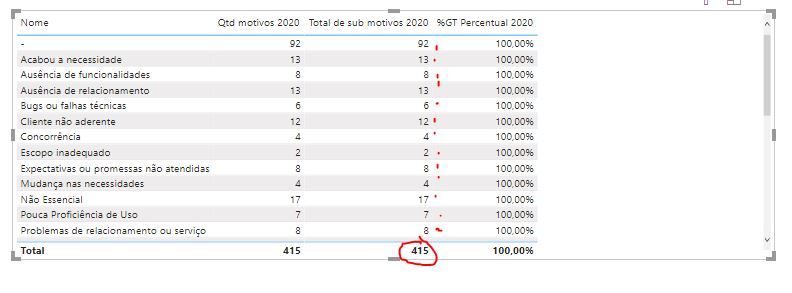
I need help to make a measure of percentage (Column "Percentual 2020"):


Capturar.JPG


I need to make de 415 stay in each row in the column "Total de sub motivos 2020" to get the correct percentage. How can I create the DAX function to get it?


2 ACCEPTED SOLUTIONS
lbendlin
Super User
Super User

you do this by modifying the filter context, for example:


Total =Calculate(sum(table[Qtd motivos 2020]),ALLSELECTED(table))


or


Total = SUMX(ALLSELECTED(table),table[Qtd motivos 2020])

View solution in original post

mahoneypat
Microsoft Employee
Microsoft Employee

To get the overall total, you can use a measure like this


Overall Total = CALCULATE(SUM(Table[Total de sub motivos 2020]), ALL(Table[Nome]))


Also, you don't need to do it in a separate measure, you can put them all together in one measure and just have your % of Total measure if you want.


If this works for you, please mark it as the solution.  Kudos are appreciated too.  Please let me know if not.

Regards,

Pat


Did I answer your question? Mark my post as a solution! Kudos are also appreciated!

To learn more about Power BI, follow me on Twitter or subscribe on YouTube.


@mahoneypa HoosierBI on YouTube


View solution in original post

4 REPLIES 4
mahoneypat
Microsoft Employee
Microsoft Employee

To get the overall total, you can use a measure like this


Overall Total = CALCULATE(SUM(Table[Total de sub motivos 2020]), ALL(Table[Nome]))


Also, you don't need to do it in a separate measure, you can put them all together in one measure and just have your % of Total measure if you want.


If this works for you, please mark it as the solution.  Kudos are appreciated too.  Please let me know if not.

Regards,

Pat


Did I answer your question? Mark my post as a solution! Kudos are also appreciated!

To learn more about Power BI, follow me on Twitter or subscribe on YouTube.


@mahoneypa HoosierBI on YouTube


fdorta
Frequent Visitor

Olá Vitor,


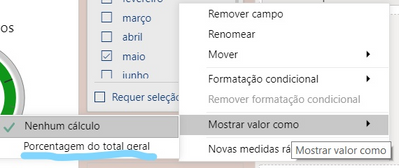
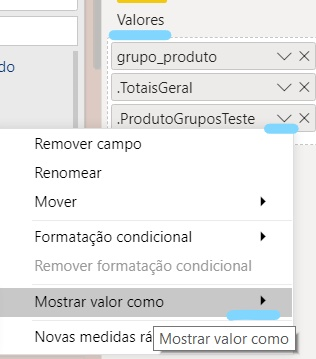
Pelo que percebi você gostaria de ter o % de cada justificativa, ou seja, quanto 92 representa % de 415...se for isto, sugiro que na medida que incluir para o "Total de Sub Motivos 2020" marque para "Mostrar Valor Como" - Porcentagem do total Geral. 


Espero que te ajude! 


fdorta_2-1593975183436.pngfdorta_3-1593975290047.png


fdorta

AntrikshSharma
Super User
Super User

GrandTotal = CALCULATE ( [TotalAmount], ALLSELECTED ( TableName[Nome] ) )
% GT Percentual 2020 = DIVIDE ( [Total Amount], [GrandTotal] )

Replace TotalAmount with the SUM ( ColumnName )

lbendlin
Super User
Super User

you do this by modifying the filter context, for example:


Total =Calculate(sum(table[Qtd motivos 2020]),ALLSELECTED(table))


or


Total = SUMX(ALLSELECTED(table),table[Qtd motivos 2020])

Helpful resources

Announcements
Power BI DataViz World Championships

Power BI Dataviz World Championships

Vote for your favorite vizzies from the Power BI World Championship submissions!

Sticker Challenge 2026 Carousel

Join our Community Sticker Challenge 2026

If you love stickers, then you will definitely want to check out our Community Sticker Challenge!

January Power BI Update Carousel

Power BI Monthly Update - January 2026

Check out the January 2026 Power BI update to learn about new features.

FabCon Atlanta 2026 carousel

FabCon Atlanta 2026

Join us at FabCon Atlanta, March 16-20, for the ultimate Fabric, Power BI, AI and SQL community-led event. Save $200 with code FABCOMM.