Fabric Data Days starts November 4th!
Advance your Data & AI career with 50 days of live learning, dataviz contests, hands-on challenges, study groups & certifications and more!
Get registered- Power BI forums
- Get Help with Power BI
- Desktop
- Service
- Report Server
- Power Query
- Mobile Apps
- Developer
- DAX Commands and Tips
- Custom Visuals Development Discussion
- Health and Life Sciences
- Power BI Spanish forums
- Translated Spanish Desktop
- Training and Consulting
- Instructor Led Training
- Dashboard in a Day for Women, by Women
- Galleries
- Data Stories Gallery
- Themes Gallery
- Contests Gallery
- Quick Measures Gallery
- Visual Calculations Gallery
- Notebook Gallery
- Translytical Task Flow Gallery
- TMDL Gallery
- R Script Showcase
- Webinars and Video Gallery
- Ideas
- Custom Visuals Ideas (read-only)
- Issues
- Issues
- Events
- Upcoming Events
Join us at FabCon Atlanta from March 16 - 20, 2026, for the ultimate Fabric, Power BI, AI and SQL community-led event. Save $200 with code FABCOMM. Register now.
- Power BI forums
- Forums
- Get Help with Power BI
- DAX Commands and Tips
- Filter context weirdness
- Subscribe to RSS Feed
- Mark Topic as New
- Mark Topic as Read
- Float this Topic for Current User
- Bookmark
- Subscribe
- Printer Friendly Page

- Mark as New
- Bookmark
- Subscribe
- Mute
- Subscribe to RSS Feed
- Permalink
- Report Inappropriate Content
Filter context weirdness
Hi there!
Perhaps a newbie question, but I can't wrap my head around how a measure reacts to filters...
I have a measure that calculates sum of sales for the most recent day in the data :
CALCULATE(
Invoices_LQ[PostDate_DateFormat] )
When I create a table with Invoices_LQ[PostDate_DateFormat] and this measure, I can see indeed the sales for the last date for every Invoices_LQ[PostDate_DateFormat] line :
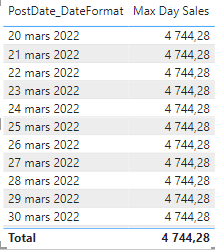
So far, so good.
However, if I create another visual showing Invoices_LQ[PostDate_DateFormat] and I select a value in there, sometimes it changes my Max Day Sales measure :
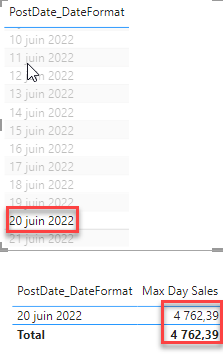
On top of that, it only seems to do so for certain Invoices_LQ[PostDate_DateFormat] only, and I haven't been able to identify some sort of pattern.
I'm guessing it has to do with some sort of context filtering I'm not understanding.
Still fairly new to PowerBI but this has given me a pretty bad headache!!
Anyone has a clue?
Thanks a lot!!
Solved! Go to Solution.


- Mark as New
- Bookmark
- Subscribe
- Mute
- Subscribe to RSS Feed
- Permalink
- Report Inappropriate Content
@paulpassot
Aparently this is Auto-Exist problem.
First step try to manually calculate the last day sales. If it does not match the result of my first solution then you need to have a date table that filters your data set. This will totally eleiminate the problem.
- Mark as New
- Bookmark
- Subscribe
- Mute
- Subscribe to RSS Feed
- Permalink
- Report Inappropriate Content
Hi @paulpassot
please try
Max Day Sales =
VAR MaxDate =
    CALCULATE ( MAX ( Invoices_LQ[PostDate_DateFormat] ), REMOVEFILTERS () )
RETURN
    CALCULATE (
        SUM ( Invoices_LQ[InvoiceLine.Amount] ),
        Invoices_LQ[PostDate_DateFormat] = MaxDate,
        REMOVEFILTERS ()
)- Mark as New
- Bookmark
- Subscribe
- Mute
- Subscribe to RSS Feed
- Permalink
- Report Inappropriate Content
Hi, thanks for the quick reply!
Interestingly, it gives the same result across dates (which is good), but it doesn't seem to give the right number:

I would expect 4,744$, not 5,358$.
I understand the logic of your code though, and I can't figure out how it comes up to 5,358$
- Mark as New
- Bookmark
- Subscribe
- Mute
- Subscribe to RSS Feed
- Permalink
- Report Inappropriate Content
@paulpassot
I don't know how your data looks like but seems to me there are other filters. You may try **bleep** this way
Max Day Sales =
VAR MaxDate =
    CALCULATE (
        MAX ( Invoices_LQ[PostDate_DateFormat] ),
        ALL ( Invoices_LQ[PostDate_DateFormat] )
    )
RETURN
    CALCULATE (
        SUM ( Invoices_LQ[InvoiceLine.Amount] ),
        Invoices_LQ[PostDate_DateFormat] = MaxDate,
        ALL ( Invoices_LQ[PostDate_DateFormat] )
)- Mark as New
- Bookmark
- Subscribe
- Mute
- Subscribe to RSS Feed
- Permalink
- Report Inappropriate Content
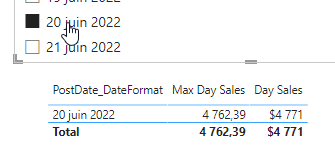
So strange... it gives me the same result as my initial formula. Randomly giving a different number depending on what I select in another visual:
Here it is ok, filtered on 21st of june
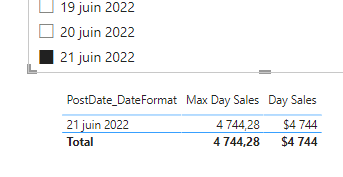
Here it gives me a different value (wrong) when filtered on the 20th of june:
My datamodel is incredibly simple: single table with sales transactions in rows, a column for price and a column for date. I made a calculated column that "rounds" the post date (which is datetime) to a regular date :
- Mark as New
- Bookmark
- Subscribe
- Mute
- Subscribe to RSS Feed
- Permalink
- Report Inappropriate Content
@paulpassot
Aparently this is Auto-Exist problem.
First step try to manually calculate the last day sales. If it does not match the result of my first solution then you need to have a date table that filters your data set. This will totally eleiminate the problem.

- Mark as New
- Bookmark
- Subscribe
- Mute
- Subscribe to RSS Feed
- Permalink
- Report Inappropriate Content
@paulpassot , Try like
Max Day Sales =
CALCULATE(
SUM( Invoices_LQ[InvoiceLine.Amount] ),
lastdate(Invoices_LQ[PostDate_DateFormat] )
)
for date
MAxx(ALL( Invoices_LQ[PostDate_DateFormat] ), Invoices_LQ[PostDate_DateFormat] )
- Mark as New
- Bookmark
- Subscribe
- Mute
- Subscribe to RSS Feed
- Permalink
- Report Inappropriate Content
Unfortunately it doesn't work, it gives me the values for each date:


Helpful resources

FabCon Global Hackathon
Join the Fabric FabCon Global Hackathon—running virtually through Nov 3. Open to all skill levels. $10,000 in prizes!

Power BI Monthly Update - October 2025
Check out the October 2025 Power BI update to learn about new features.

FabCon Atlanta 2026
Join us at FabCon Atlanta, March 16-20, for the ultimate Fabric, Power BI, AI and SQL community-led event. Save $200 with code FABCOMM.

| User | Count |
|---|---|
| 8 | |
| 6 | |
| 3 | |
| 3 | |
| 3 |


| User | Count |
|---|---|
| 11 | |
| 9 | |
| 8 | |
| 7 | |
| 6 |


