Join us at FabCon Atlanta from March 16 - 20, 2026, for the ultimate Fabric, Power BI, AI and SQL community-led event. Save $200 with code FABCOMM.
Register now!Vote for your favorite vizzies from the Power BI Dataviz World Championship submissions. Vote now!
Hello,
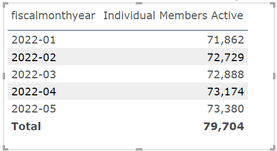
I need to create a calculation to show the Average Individual Members Active This Year. In the example below the avg. would be 72,807.
I've tried averaging Individual Members Active a few ways and I keep getting errors that the column cannot be used in the type of expression. I think it's because it's summing multiple individuals. I think I need a sum of indivduals members active this year and to use that somehow but I'm stuck on to what that calculation may be.
Here's the Individual Members Active Calculation -
fiscalmonthyear is part of the Date table.
Thanks,
Kristin
Solved! Go to Solution.
Hi,
I am not sure if I understood your question correctly, but please try the below measure.
Average measure: =
AVERAGEX (
VALUES ( 'calendartable'[fiscalmonthyear] ),
[Individual Members Active]
)
Hi,
I am not sure if I understood your question correctly, but please try the below measure.
Average measure: =
AVERAGEX (
VALUES ( 'calendartable'[fiscalmonthyear] ),
[Individual Members Active]
)
Vote for your favorite vizzies from the Power BI World Championship submissions!
If you love stickers, then you will definitely want to check out our Community Sticker Challenge!
Check out the January 2026 Power BI update to learn about new features.
| User | Count |
|---|---|
| 7 | |
| 5 | |
| 4 | |
| 3 | |
| 3 |
| User | Count |
|---|---|
| 19 | |
| 10 | |
| 6 | |
| 6 | |
| 5 |