Don't miss your chance to take exam DP-600 or DP-700 on us!
Request nowLearn from the best! Meet the four finalists headed to the FINALS of the Power BI Dataviz World Championships! Register now
Hello,
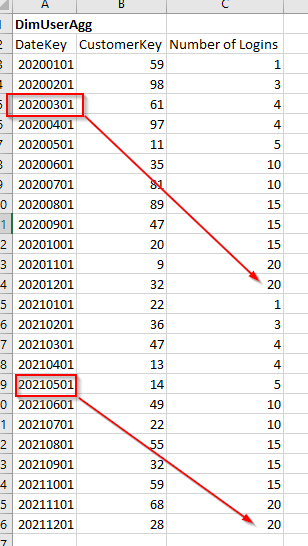
I have a dimUserAgg table that defines aggregated user activity data (number of logins and etc.) accumulated per month:
dimDate 1:* dimUserAgg (relationship not active)
dimDate 1:* Fact (active relationship)
I want to filter on the max Number of Logins available based on Date filters. Max Number of Logins is always the last month of the year. If date is set to 2020 March, I only want to return the Number of Logins for 2020 Dec, if it's 2021 May then 2021 Dec.
Is there a way to write a DAX using the Calculate, MAX date function or any other syntax to arrive to this?
Thanks in advance for any ideas.
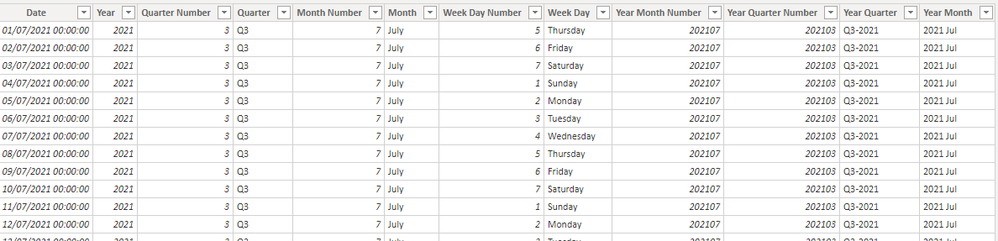
dimDate
dimUserAgg
Solved! Go to Solution.
Hi @Dom87326 ,
Your Error means that you compare whole number type column by text type column. According to your statement, I think DimUserAgg[DateKey] is whole number type .
"VAR _LM =YEAR( _M ) & 12 & 01" in measure from VahidDM will return text. And you compare it with DimUserAgg[DateKey] in filter.
Measure =
VAR _M =
MAX( DimDate[Date] )
VAR _LM =
YEAR( _M ) & 12 & 01
RETURN
CALCULATE(
MAX( DimUserAgg[Number of Logins] ),
FILTER( ALL( DimUserAgg ), DimUserAgg[DateKey] = _LM )
)
Format Date column to yyyymmdd will return text type result as well.
You can try this code.
Measure =
VAR _M =
MAX( DimDate[Date] )
VAR _LM =
YEAR( _M )*10000 + 1201
RETURN
CALCULATE(
SUM( DimUserAgg[Number of Logins] ),
FILTER( ALL( DimUserAgg ), DimUserAgg[DateKey] = _LM )
)
Best Regards,
Rico Zhou
If this post helps, then please consider Accept it as the solution to help the other members find it more quickly.
Hello @VahidDM
I've added one more variable for Month.
However with this syntax I get the following error: MdxScript(Model) (358, 57) Calculation error in measure : DAX comparison operations do not support comparing values of type Number with values of type Text. Consider using the VALUE or FORMAT function to convert one of the values.
test_1 =
VAR _Y =
MAX( DimDate[Date] )
VAR _M =
MAX( DimDate[Date] )
VAR _LM =
YEAR( _Y ) & MONTH( _M ) & VALUE(01)
RETURN
CALCULATE(
MAX( DimUserAgg[Number of Logins] ),
FILTER( ALL( DimUserAgg ), DimUserAgg[%DATE_KEY] = _LM ))
I've created DimDate by using below code, while DimUserAgg[%DATE_KEY] is integer type from source.
Date =
VAR MinYear = YEAR ( MIN ( 'Fact'[%DATE] ) )
VAR MaxYear = YEAR ( MAX ( 'Fact'[%DATE] ) )
RETURN
ADDCOLUMNS (
FILTER (
CALENDARAUTO ( ),
YEAR ( [Date] ) >= MinYear &&
YEAR ( [Date] ) <= MaxYear
)
Is it possible using FORMAT to change DimUserAgg[%DATE_KEY] type to date yyyymmdd?
Hi @Dom87326 ,
Your Error means that you compare whole number type column by text type column. According to your statement, I think DimUserAgg[DateKey] is whole number type .
"VAR _LM =YEAR( _M ) & 12 & 01" in measure from VahidDM will return text. And you compare it with DimUserAgg[DateKey] in filter.
Measure =
VAR _M =
MAX( DimDate[Date] )
VAR _LM =
YEAR( _M ) & 12 & 01
RETURN
CALCULATE(
MAX( DimUserAgg[Number of Logins] ),
FILTER( ALL( DimUserAgg ), DimUserAgg[DateKey] = _LM )
)
Format Date column to yyyymmdd will return text type result as well.
You can try this code.
Measure =
VAR _M =
MAX( DimDate[Date] )
VAR _LM =
YEAR( _M )*10000 + 1201
RETURN
CALCULATE(
SUM( DimUserAgg[Number of Logins] ),
FILTER( ALL( DimUserAgg ), DimUserAgg[DateKey] = _LM )
)
Best Regards,
Rico Zhou
If this post helps, then please consider Accept it as the solution to help the other members find it more quickly.
Hi @Dom87326
Try this:
Measure =
VAR _M =
MAX( DimDate[Date] )
VAR _LM =
YEAR( _M ) & 12 & 01
RETURN
CALCULATE(
MAX( DimUserAgg[Number of Logins] ),
FILTER( ALL( DimUserAgg ), DimUserAgg[DateKey] = _LM )
)
If this post helps, please consider accepting it as the solution to help the other members find it more quickly.
Appreciate your Kudos!!
LinkedIn: www.linkedin.com/in/vahid-dm/
Share feedback directly with Fabric product managers, participate in targeted research studies and influence the Fabric roadmap.
Check out the February 2026 Power BI update to learn about new features.
| User | Count |
|---|---|
| 5 | |
| 4 | |
| 3 | |
| 2 | |
| 2 |