Get certified for free when you join Fabric Data Days 2026 and dive into Fabric, Power BI, SQL, AI, and other essential data skills.
Join nowData Days is here! Join us now for 60+ days of learning, challenges, and connection. Learn more
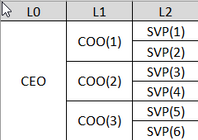
I'm trying to create a dynamic title that makes sense for our manager hierarchy when using "go to the next level of the hierarchy". I have a manager hierarchy set up like this, that goes down to L11.
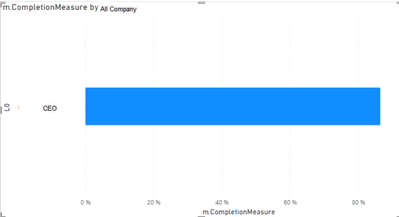
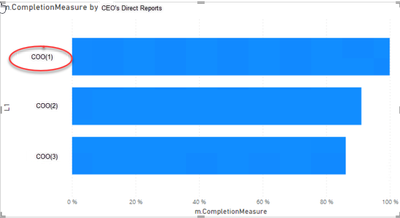
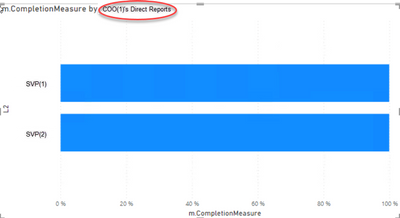
I'd like the titles to reflect the leader one level above the level being viewed on the visual, starting with a generic level like "All Company". So it would look like this:
View of all company
Drilled one level down, now seeing "CEO's Direct Reports"
Drilled into COO(1), now seeing "COO(1)'s Direct Reports"
Is this possible? Or is there another way I can clearly show my users where they are in the hierarchy? Our structure can be very confusing...
Thank you!
Solved! Go to Solution.
Hi @jlaroo33 ,
According to my knowledge, your requirement may not be realized currently.
If you want this in Power BI, let the power bi community to know this things and give your votes at Fabric Ideas, you may vote the idea and comment to improve this feature. It is a place for customers provide feedback about Microsoft Fabric products . What’s more, if a feedback is high voted there by other customers, it will be promising that Microsoft Product Team will take it into consideration when designing the next version in the future.
Best Regards,
Jianbo Li
If this post helps, then please consider Accept it as the solution to help the other members find it more quickly.
@v-jianboli-msft thank you for the response! Your suggestion works when doing a single drill down. I'm hoping for a solution that works when using either the double arrows or expand arrows. Any thoughts on if that's possible? I'm starting to think it's not, because expanding doesn't filter anything...
Hi @jlaroo33 ,
According to my knowledge, your requirement may not be realized currently.
If you want this in Power BI, let the power bi community to know this things and give your votes at Fabric Ideas, you may vote the idea and comment to improve this feature. It is a place for customers provide feedback about Microsoft Fabric products . What’s more, if a feedback is high voted there by other customers, it will be promising that Microsoft Product Team will take it into consideration when designing the next version in the future.
Best Regards,
Jianbo Li
If this post helps, then please consider Accept it as the solution to help the other members find it more quickly.
Hi @jlaroo33 ,
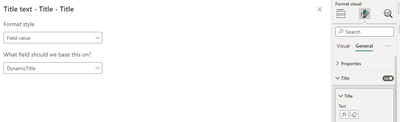
Please try:
DynamicTitle =
SWITCH(TRUE(),
ISFILTERED('Table'[L0])&&ISFILTERED('Table'[L1])&&ISFILTERED('Table'[L2]),CONCATENATEX(DISTINCT('Table'[L2]),[L2],","),
ISFILTERED('Table'[L0])&&ISFILTERED('Table'[L1]),CONCATENATEX(DISTINCT('Table'[L1]),[L1],","),
ISFILTERED('Table'[L0]),CONCATENATEX(DISTINCT('Table'[L0]),[L0],","),
"All Company") & " Direct Report"
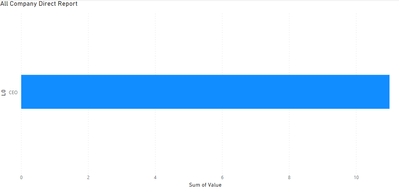
Final output:
Best Regards,
Jianbo Li
If this post helps, then please consider Accept it as the solution to help the other members find it more quickly.
Don't miss out on Data Days, June 15 through August 7. Learn Fabric, Power BI, SQL, AI and more.
Check out the May 2026 Power BI update to learn about new features.
| User | Count |
|---|---|
| 3 | |
| 2 | |
| 2 | |
| 1 | |
| 1 |