Share feedback directly with Fabric product managers, participate in targeted research studies and influence the Fabric roadmap.
Sign up nowGet Fabric certified for FREE! Don't miss your chance! Learn more
Hy,
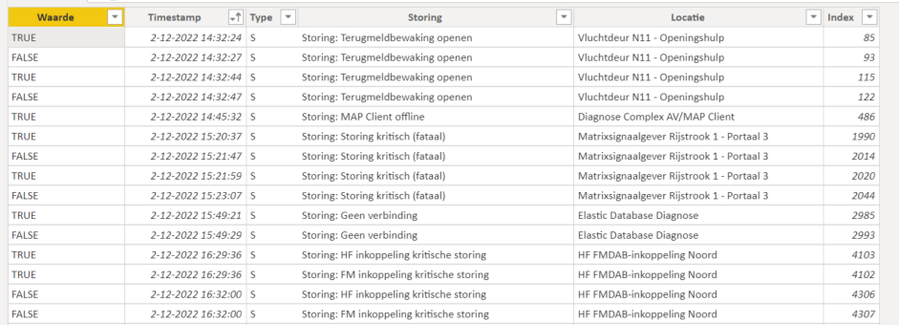
I got a blackbox file with on a record the failure start datetimestamp (TRUE) en on a other record de failure end datetimestamp.(FALSE). De first failure has a duration of 3 seconds.
How can i calculate the duration for each failure on the locations (Locatie) ?
Thank you.
Solved! Go to Solution.
Sure! try this:
SUMMARIZE (
ADDCOLUMNS('Table', "Date", LEFT(CONVERT('Table'[Timestamp],STRING),10)),
'Table'[Location],[Date],
"Duration",
DATEDIFF(CALCULATE ( MAX ( 'Table'[Timestamp] ), 'Table'[Failure] = TRUE() )
, CALCULATE ( MIN ( 'Table'[Timestamp] ), 'Table'[Failure] = FALSE() ), SECOND)
)
I changed the duration calculation to use DATEDIFF function instead, in case you're expecting the failure to last longer than a minute.
If you need to format that, there's a good article that talks about it here:
Aggregating Duration/Time - Microsoft Power BI Community
Jewel
Thanks you Jewel.
This is the view i was looking for.
Thank you, I have a summarize per location.
I only changed the Minute in Seconds.
René
You can try to create a table with DAX like this:
CalculatedTable =
SUMMARIZE (
'Table',
'Table'[Location],
"Duration",
MINUTE (
CALCULATE ( MAX ( 'Table'[Timestamp] ), 'Table'[Failure] = FALSE () )
- CALCULATE ( MIN ( 'Table'[Timestamp] ), 'Table'[Failure] = TRUE () )
)
)
Hope this helps!
Jewel
Thank you,
Is it also prissible to summarixe per date ?
Regards René
Sure! try this:
SUMMARIZE (
ADDCOLUMNS('Table', "Date", LEFT(CONVERT('Table'[Timestamp],STRING),10)),
'Table'[Location],[Date],
"Duration",
DATEDIFF(CALCULATE ( MAX ( 'Table'[Timestamp] ), 'Table'[Failure] = TRUE() )
, CALCULATE ( MIN ( 'Table'[Timestamp] ), 'Table'[Failure] = FALSE() ), SECOND)
)
I changed the duration calculation to use DATEDIFF function instead, in case you're expecting the failure to last longer than a minute.
If you need to format that, there's a good article that talks about it here:
Aggregating Duration/Time - Microsoft Power BI Community
Jewel
If you love stickers, then you will definitely want to check out our Community Sticker Challenge!
Check out the January 2026 Power BI update to learn about new features.
| User | Count |
|---|---|
| 7 | |
| 4 | |
| 4 | |
| 3 | |
| 2 |
| User | Count |
|---|---|
| 15 | |
| 9 | |
| 9 | |
| 7 | |
| 5 |