cancel
Showing results for 
Search instead for 
Did you mean: 

The Power BI Data Visualization World Championships is back! It's time to submit your entry. Live now!

Reply
Anonymous
Not applicable

Duration of failure over 2 rows - records

Hy,

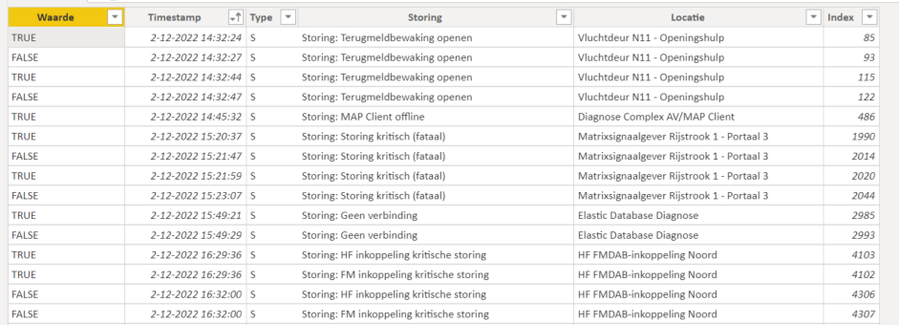
I got a blackbox file with on a record the failure start datetimestamp (TRUE) en on a other record de failure end datetimestamp.(FALSE). De first failure has a duration of 3 seconds.

How can i calculate the duration for each failure on the locations (Locatie) ? 

Rene1969_0-1671631674217.png


Thank you.


1 ACCEPTED SOLUTION

Sure! try this:


SUMMARIZE (
    ADDCOLUMNS('Table', "Date", LEFT(CONVERT('Table'[Timestamp],STRING),10)),
    'Table'[Location],[Date],
    "Duration",
    DATEDIFF(CALCULATE ( MAX ( 'Table'[Timestamp] ), 'Table'[Failure] = TRUE()  )
                , CALCULATE ( MIN ( 'Table'[Timestamp] ), 'Table'[Failure] = FALSE() ), SECOND)

)


I changed the duration calculation to use DATEDIFF function instead, in case you're expecting the failure to last longer than a minute.


If you need to format that, there's a good article that talks about it here:

Aggregating Duration/Time - Microsoft Power BI Community


Jewel

View solution in original post

5 REPLIES 5
Anonymous
Not applicable

Thanks you Jewel. 
This is the view i was looking for.

Anonymous
Not applicable

Thank you, I have a summarize per location.

I only changed the Minute in Seconds.


René

jewel_at
Resolver I
Resolver I

You can try to create a table with DAX like this:


CalculatedTable =
SUMMARIZE (
'Table',
'Table'[Location],
"Duration",
MINUTE (
CALCULATE ( MAX ( 'Table'[Timestamp] ), 'Table'[Failure] = FALSE () )
- CALCULATE ( MIN ( 'Table'[Timestamp] ), 'Table'[Failure] = TRUE () )
)
)


Hope this helps!


Jewel

Anonymous
Not applicable

Thank you,
Is it also prissible to summarixe per date ?


Regards René

Sure! try this:


SUMMARIZE (
    ADDCOLUMNS('Table', "Date", LEFT(CONVERT('Table'[Timestamp],STRING),10)),
    'Table'[Location],[Date],
    "Duration",
    DATEDIFF(CALCULATE ( MAX ( 'Table'[Timestamp] ), 'Table'[Failure] = TRUE()  )
                , CALCULATE ( MIN ( 'Table'[Timestamp] ), 'Table'[Failure] = FALSE() ), SECOND)

)


I changed the duration calculation to use DATEDIFF function instead, in case you're expecting the failure to last longer than a minute.


If you need to format that, there's a good article that talks about it here:

Aggregating Duration/Time - Microsoft Power BI Community


Jewel

Helpful resources

Announcements
Power BI DataViz World Championships

Power BI Dataviz World Championships

The Power BI Data Visualization World Championships is back! It's time to submit your entry.

December 2025 Power BI Update Carousel

Power BI Monthly Update - December 2025

Check out the December 2025 Power BI Holiday Recap!

FabCon Atlanta 2026 carousel

FabCon Atlanta 2026

Join us at FabCon Atlanta, March 16-20, for the ultimate Fabric, Power BI, AI and SQL community-led event. Save $200 with code FABCOMM.