Join us at FabCon Atlanta from March 16 - 20, 2026, for the ultimate Fabric, Power BI, AI and SQL community-led event. Save $200 with code FABCOMM.
Register now!The Power BI Data Visualization World Championships is back! Get ahead of the game and start preparing now! Learn more
Hi everyone, I am very new to DAX and the purpose of using Pbi is to model data for our manufacturing production control.
I have collected data for the below:
-Time study data ( Machine, Material #, Pieces/Hr) "Look up table"
-Completed work ticket data (Machine, Material #, [Measure: Pieces/Hr])
Our material# profiles can run on different machines but has different pieces/hr. Goal is to make a simple calculation by dividing pieces/hr(Completed work ticket data) with pieces/hr (Time study data). Returning production efficiency based on material# and machines.
Currently relationship between the 2 tables are many to many for "material #" and "machine". If i use SUM for the time study data, it will sum all machines producing the same profile. If I use average for the time study data, it will only return an average value for all machines producing the same profile. How could I fix that??
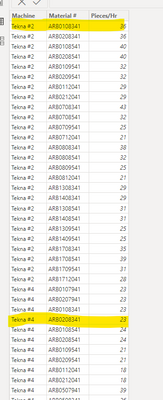
**As you can see, highlighted have same profile but different machine
*Current relationship
Hi @nicklabh
easiest approach is to create a new column in both tables which is the concatenation of Machine and Material # columns that would be a primary key i the dimension (lookup table) and will enable the creation of one to many relationship. Then youe measure would simply be
DivisionMeasure =
AVERAGEX ( TimeStudyRawDat, DIVIDE ( [Prices/HR], TimeStudyRawDat[Prices/HR] ) )
Hi tamerj1, thank you for your answer.
I have added the concate column and now it is relationship in 1 to many. However the formula is not producing the correct % calculation
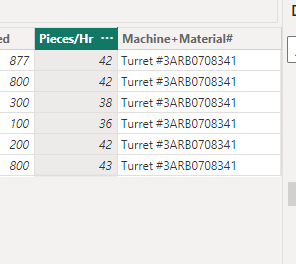
Timestudyraw data table (64 pieces/hr)
Completed ticket data table (Average 40.5 pieces/hr)
Correct calcuation is 40.5/64 = 63%
However, the current calculation is
Can please copy/paste the dax? It is not clear in the screenshot. Why do you need to use LOOKUPVALUE?
My apologies, I used the wrong data anyway.
Please see the following Dax:
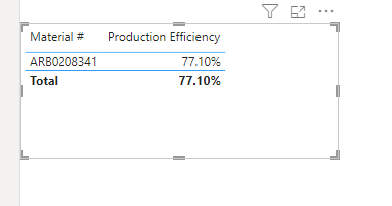
It should be returning 67.5%, but it is returning 77.1%
Completed ticket data:
Timestudydata:
@nicklabh
In your visual you should be using the [Material #] from the TimeStudyRawDat table (the dimension table). Then apply the following measure.
Note: Please do not use LOOKUPVALUE, as it is an inefficient FUNCTION and proves useless in many scenarios.
Production Efficiency =
AVERAGEX (
TimeStudyRawDat,
DIVIDE (
AVERAGE ( 'Completed Ticket Data'[Pieces/Hr] ),
TimeStudyRawDat[Prices/HR]
)
)
The Power BI Data Visualization World Championships is back! Get ahead of the game and start preparing now!
| User | Count |
|---|---|
| 19 | |
| 13 | |
| 9 | |
| 4 | |
| 4 |
| User | Count |
|---|---|
| 29 | |
| 24 | |
| 17 | |
| 11 | |
| 10 |