cancel
Showing results for 
Search instead for 
Did you mean: 

The Power BI Data Visualization World Championships is back! Get ahead of the game and start preparing now! Learn more

Reply
nicklabh
New Member

Division based on 2 other values from different columns

Hi everyone, I am very new to DAX and the purpose of using Pbi is to model data for our manufacturing production control.


I have collected data for the below:

-Time study data ( Machine, Material #, Pieces/Hr) "Look up table"

-Completed work ticket data (Machine, Material #, [Measure: Pieces/Hr])


Our material# profiles can run on different machines but has different pieces/hr. Goal is to make a simple calculation by dividing pieces/hr(Completed work ticket data) with pieces/hr (Time study data). Returning production efficiency based on material# and machines.


Currently relationship between the 2 tables are many to many for "material #" and "machine". If i use SUM for the time study data, it will sum all machines producing the same profile. If I use average for the time study data, it will only return an average value for all machines producing the same profile. How could I fix that??
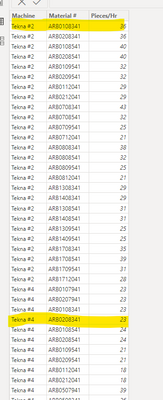
 

nicklabh_0-1682437762284.png

**As you can see, highlighted have same profile but different machine


nicklabh_1-1682437802617.png

*Current relationship


5 REPLIES 5
tamerj1
Super User
Super User

Hi @nicklabh 

easiest approach is to create a new column in both tables which is the concatenation of Machine and Material # columns that would be a primary key i the dimension (lookup table) and will enable the creation of one to many relationship. Then youe measure would simply be

DivisionMeasure =
AVERAGEX ( TimeStudyRawDat, DIVIDE ( [Prices/HR], TimeStudyRawDat[Prices/HR] ) )

Hi tamerj1, thank you for your answer.


I have added the concate column and now it is relationship in 1 to many. However the formula is not producing the correct % calculation


  • Completed ticket data table exist measure pieces/Hr for each line
  • Timestudyraw data table exist pieces/Hr


nicklabh_0-1682529964011.png

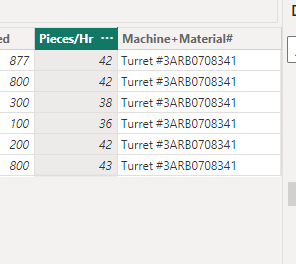
Timestudyraw data table (64 pieces/hr)

nicklabh_1-1682530009620.png

Completed ticket data table (Average 40.5 pieces/hr)


Correct calcuation is 40.5/64 = 63%


However, the current calculation is


nicklabh_2-1682530295222.png


@nicklabh 

Can please copy/paste the dax? It is not clear in the screenshot. Why do you need to use LOOKUPVALUE?

My apologies, I used the wrong data anyway.

Please see the following Dax:

nicklabh_0-1682530868658.png


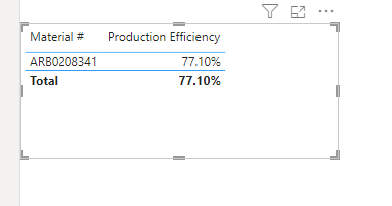
It should be returning 67.5%, but it is returning 77.1%


nicklabh_1-1682530920851.png


Completed ticket data:

nicklabh_2-1682530961135.png


Timestudydata:

nicklabh_3-1682530990287.png


@nicklabh 
In your visual you should be using the [Material #] from the TimeStudyRawDat table (the dimension table). Then apply the following measure. 

Note: Please do not use LOOKUPVALUE, as it is an inefficient FUNCTION and proves useless in many scenarios.

Production Efficiency =
AVERAGEX (
    TimeStudyRawDat,
    DIVIDE (
        AVERAGE ( 'Completed Ticket Data'[Pieces/Hr] ),
        TimeStudyRawDat[Prices/HR]
    )
)


Helpful resources

Announcements
Power BI DataViz World Championships

Power BI Dataviz World Championships

The Power BI Data Visualization World Championships is back! Get ahead of the game and start preparing now!

December 2025 Power BI Update Carousel

Power BI Monthly Update - December 2025

Check out the December 2025 Power BI Holiday Recap!

FabCon Atlanta 2026 carousel

FabCon Atlanta 2026

Join us at FabCon Atlanta, March 16-20, for the ultimate Fabric, Power BI, AI and SQL community-led event. Save $200 with code FABCOMM.