Join us at FabCon Atlanta from March 16 - 20, 2026, for the ultimate Fabric, Power BI, AI and SQL community-led event. Save $200 with code FABCOMM.
Register now!The Power BI Data Visualization World Championships is back! Get ahead of the game and start preparing now! Learn more
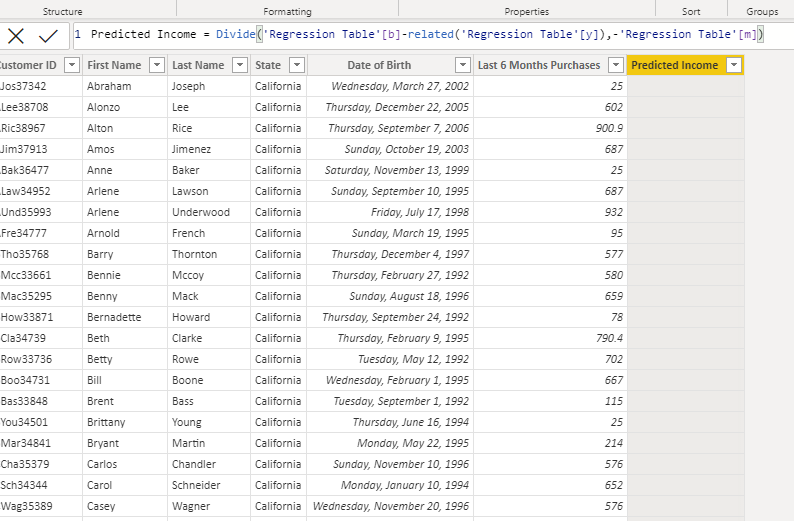
I am trying to create a calculated column in the customer table for predicted customer incomes using the divide Function and gives me a Blank column, although the formula is correct
Solved! Go to Solution.
@Sheref_Morad
Here is your fil with the solution https://www.dropbox.com/t/CChylr4UPd28RtxH
Measures are automatically wrapped with CALCULATE which forces context transition. On the other hand using the formulas directly will be extremely complicated. Therefore, use can do the following:
Predicted Income =
Divide (
RELATED ( 'Regression Table'[y] ) - CALCULATE ( [b], ALL ( 'Regression Table' ) ),
CALCULATE ( [m], ALL ( 'Regression Table' ) )
)This shall solve your problem.
Hello, I have the same problem. Even though I placed the correct formula the values are wrong.
Adding columns to the customer table which simply calculate [b] and [m] both return blank results, hence the blank result in your divide formula. You can use CALCULATE( [b], REMOVEFILTERS('Customer List')), which returns a value, but without a deep understanding of your model I don't know if there are only specific columns on Customer List which should have filters removed, or if there are other filters on other tables which should be removed.
I guess you have One to One relationship between the customer table and the regression table. In this case I think you've missed to wrap column [b] and column [m] with RELATED function.
Hi tamer
thank you for answering, the problem is still the same M the other thing is m and b are measures not columns
Here the power Bi file I hope you yook take a look at it , specially the customer table and the regression table
https://bit.ly/3pzNo5r
@Sheref_Morad
Here is your fil with the solution https://www.dropbox.com/t/CChylr4UPd28RtxH
Measures are automatically wrapped with CALCULATE which forces context transition. On the other hand using the formulas directly will be extremely complicated. Therefore, use can do the following:
Predicted Income =
Divide (
RELATED ( 'Regression Table'[y] ) - CALCULATE ( [b], ALL ( 'Regression Table' ) ),
CALCULATE ( [m], ALL ( 'Regression Table' ) )
)This shall solve your problem.
The Power BI Data Visualization World Championships is back! Get ahead of the game and start preparing now!
Check out the November 2025 Power BI update to learn about new features.
| User | Count |
|---|---|
| 20 | |
| 10 | |
| 9 | |
| 4 | |
| 4 |
| User | Count |
|---|---|
| 34 | |
| 31 | |
| 20 | |
| 12 | |
| 11 |