Don't miss your chance to take the Fabric Data Engineer (DP-700) exam on us!
Learn moreWe've captured the moments from FabCon & SQLCon that everyone is talking about, and we are bringing them to the community, live and on-demand. Starts on April 14th. Register now
Hello,
Can someone help with the following issue?
In a table like the below sample, I need to count the number of cars who have "white" and "black" colors.
| Car | Color |
| BMW | green |
| BMW | light-green |
| BMW | blue |
| BMW | red |
| Audy | yellow |
| Audy | black |
| Audy | blue |
| Audy | red |
| Audy | white |
| Peugeot | blue |
| Peugeot | red |
| Peugeot | yellow |
| Suzuky | black |
| Suzuky | green |
| Suzuky | light-green |
| Suzuky | blue |
| Toyota | red |
| Toyota | white |
| Toyota | blue |
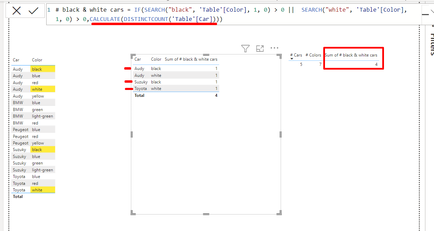
I am using the following calculated column, but instead of DISTINCTCOUNT of cars (3 cars), I am getting the count of the colors (4):
# black & white cars = IF(SEARCH("black", 'Table'[Color], 1, 0) > 0 || SEARCH("white", 'Table'[Color], 1, 0) > 0,CALCULATE(DISTINCTCOUNT('Table'[Car])))
Can you help me understand what I am doing wrong? I need a calculated column or measure that returns just the 3 cars who have the colors I'm searching for.
Thanks!
Solved! Go to Solution.
Hi @Chris2016
The issue is using a calculated column rather than a measure. Counting the distinct Cars needs to be done as a measure.
# black & white cars measure =
CALCULATE(
DISTINCTCOUNT('Table'[Car]),
'Table'[Color] IN {"black", "white"}
)
Hi, @PaulOlding,
Thanks a lot for this simple and practical solution, it works for the scenario that I've given in this post.
However, I was using the Search function because I am able to search parts of the value. E.g. I am searching for "white" in values such as: White, Ghost white, White smoke, White solid, Ash-white etc.
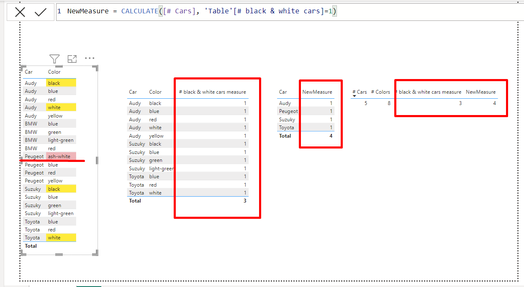
In the sample table I added one more row where the is a Peugeot with Ash-white color. The IN function does not pick it up, but with Search, I am able to get it.
So what I did was take your advice on creating a measure (on top of the calculated column I previously specified) and it gives me the distinctcount of cars that match the specified search criteria:
NewMeasure = CALCULATE([# Cars], 'Table'[# black & white cars]=1)
Thanks a lot!
Hi @Chris2016
The issue is using a calculated column rather than a measure. Counting the distinct Cars needs to be done as a measure.
# black & white cars measure =
CALCULATE(
DISTINCTCOUNT('Table'[Car]),
'Table'[Color] IN {"black", "white"}
)
Hi, @PaulOlding,
Thanks a lot for this simple and practical solution, it works for the scenario that I've given in this post.
However, I was using the Search function because I am able to search parts of the value. E.g. I am searching for "white" in values such as: White, Ghost white, White smoke, White solid, Ash-white etc.
In the sample table I added one more row where the is a Peugeot with Ash-white color. The IN function does not pick it up, but with Search, I am able to get it.
So what I did was take your advice on creating a measure (on top of the calculated column I previously specified) and it gives me the distinctcount of cars that match the specified search criteria:
NewMeasure = CALCULATE([# Cars], 'Table'[# black & white cars]=1)
Thanks a lot!
If you have recently started exploring Fabric, we'd love to hear how it's going. Your feedback can help with product improvements.
A new Power BI DataViz World Championship is coming this June! Don't miss out on submitting your entry.
Share feedback directly with Fabric product managers, participate in targeted research studies and influence the Fabric roadmap.
| User | Count |
|---|---|
| 22 | |
| 13 | |
| 10 | |
| 6 | |
| 5 |