cancel
Showing results for 
Search instead for 
Did you mean: 

The Power BI Data Visualization World Championships is back! It's time to submit your entry. Live now!

Reply
Chris2016
Resolver I
Resolver I

Distinctcount when using the Search function

Hello,

Can someone help with the following issue?

In a table like the below sample, I need to count the number of cars who have "white" and "black" colors.

CarColor
BMWgreen
BMWlight-green
BMWblue
BMWred
Audyyellow
Audyblack
Audyblue
Audyred
Audywhite
Peugeotblue
Peugeotred
Peugeotyellow
Suzukyblack
Suzukygreen
Suzukylight-green
Suzukyblue
Toyotared
Toyotawhite
Toyotablue


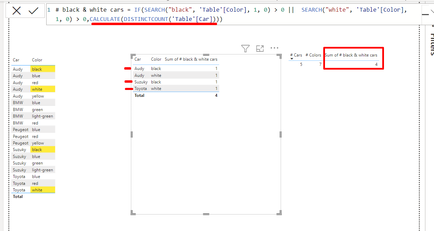
I am using the following calculated column, but instead of DISTINCTCOUNT of cars (3 cars), I am getting the count of the colors (4):

# black & white cars = IF(SEARCH("black", 'Table'[Color], 1, 0) > 0 ||  SEARCH("white", 'Table'[Color], 1, 0) > 0,CALCULATE(DISTINCTCOUNT('Table'[Car])))


Chris2016_1-1670518038784.png


Can you help me understand what I am doing wrong? I need a calculated column or measure that returns just the 3 cars who have the colors I'm searching for. 


Thanks! 

2 ACCEPTED SOLUTIONS
PaulOlding
Solution Sage
Solution Sage

Hi @Chris2016 

The issue is using a calculated column rather than a measure.  Counting the distinct Cars needs to be done as a measure.

# black & white cars measure = 
CALCULATE(
    DISTINCTCOUNT('Table'[Car]),
    'Table'[Color] IN {"black", "white"}
    )


View solution in original post

Hi, @PaulOlding,

Thanks a lot for this simple and practical solution, it works for the scenario that I've given in this post.
However, I was using the Search function because I am able to search parts of the value. E.g. I am searching for "white" in values such as: White, Ghost white, White smoke, White solid, Ash-white etc.

In the sample table I added one more row where the is a Peugeot with Ash-white color. The IN function does not pick it up, but with Search, I am able to get it. 

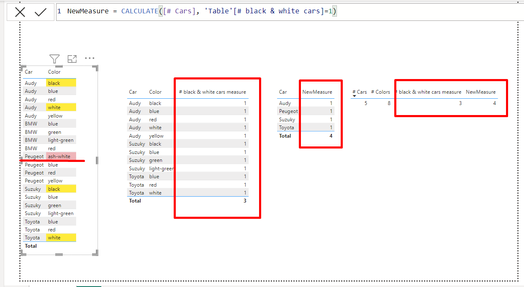
So what I did was take your advice on creating a measure (on top of the calculated column I previously specified) and it gives me the distinctcount of cars that match the specified search criteria:

NewMeasure = CALCULATE([# Cars], 'Table'[# black & white cars]=1)

Chris2016_0-1670570932258.png


Thanks a lot!

View solution in original post

2 REPLIES 2
PaulOlding
Solution Sage
Solution Sage

Hi @Chris2016 

The issue is using a calculated column rather than a measure.  Counting the distinct Cars needs to be done as a measure.

# black & white cars measure = 
CALCULATE(
    DISTINCTCOUNT('Table'[Car]),
    'Table'[Color] IN {"black", "white"}
    )


Hi, @PaulOlding,

Thanks a lot for this simple and practical solution, it works for the scenario that I've given in this post.
However, I was using the Search function because I am able to search parts of the value. E.g. I am searching for "white" in values such as: White, Ghost white, White smoke, White solid, Ash-white etc.

In the sample table I added one more row where the is a Peugeot with Ash-white color. The IN function does not pick it up, but with Search, I am able to get it. 

So what I did was take your advice on creating a measure (on top of the calculated column I previously specified) and it gives me the distinctcount of cars that match the specified search criteria:

NewMeasure = CALCULATE([# Cars], 'Table'[# black & white cars]=1)

Chris2016_0-1670570932258.png


Thanks a lot!

Helpful resources

Announcements
FabCon Atlanta 2026 carousel

FabCon Atlanta 2026

Join us at FabCon Atlanta, March 16-20, for the ultimate Fabric, Power BI, AI and SQL community-led event. Save $200 with code FABCOMM.