Advance your Data & AI career with 50 days of live learning, dataviz contests, hands-on challenges, study groups & certifications and more!
Get registeredGet Fabric Certified for FREE during Fabric Data Days. Don't miss your chance! Request now
Hello guys,
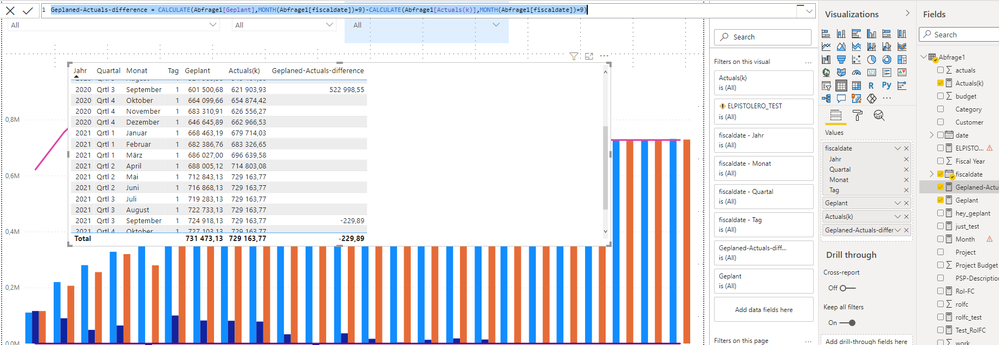
I need to create a dax formula that calculate the difference between 2 mesures in month 9 of every year.
I used this formulat:
Geplaned-Actuals-difference = CALCULATE(Abfrage1[Geplant],MONTH(Abfrage1[fiscaldate])=9)-CALCULATE(Abfrage1[Actuals(k)],MONTH(Abfrage1[fiscaldate])=9)
and it didnt give me a logical result. what should I change ?
@Aymen_Soussi , a measure like this with help from date table
This Year = CALCULATE(sum('Table'[Qty]),filter(ALL('Date'),'Date'[Year]=max('Date'[Year]) && 'Date'[Month] = 9))
Last Year = CALCULATE(sum('Table'[Qty]),filter(ALL('Date'),'Date'[Year]=max('Date'[Year])-1 && 'Date'[Month] = 9 ))
@amitchandak I tired my formula with an other files containing simple data and it gives me logical result. The problem that I faced in this case is that when I do filters on date the values of the original mesures ( ['Geplant'] and ['Aktuals(K)'] ) that I'm using to calculate the result are changing. Is there any workaround to bypass this issue or I need first to work on the ['Geplant'] and ['Aktuals(K)'] to make their result stable even when I do date filters? Is a mesure considerated to be valid if give me the wanted result even if filter make it given different result ?
Advance your Data & AI career with 50 days of live learning, contests, hands-on challenges, study groups & certifications and more!
Check out the October 2025 Power BI update to learn about new features.
| User | Count |
|---|---|
| 8 | |
| 6 | |
| 5 | |
| 5 | |
| 4 |
| User | Count |
|---|---|
| 25 | |
| 16 | |
| 8 | |
| 7 | |
| 7 |