cancel
Showing results for 
Search instead for 
Did you mean: 

Did you hear? There's a new SQL AI Developer certification (DP-800). Start preparing now and be one of the first to get certified. Register now

Reply
Anonymous
Not applicable

Dax - switch function

hi all , DAX is A new language for me (:


i have column "postion name" & "Actual amount" most of  them come directly from the DB and some are calculated

like 'NRI' is calculation of "GRI" + 'LRI'

when i use SWITCH(TRUE() function:


i use this option:

----

return
SWITCH(TRUE(),
MAX('9 - Controling'[POSITIONS_NAME])="NRI" , CALCULATE(sum('9 - Controling'[Actual Amount]),'9 - Controling'[POSITIONS_NAME])="GRI")

----

I received this error message : dax comparison do not support comparing values of type number with value text

thanks,

sinayha

3 REPLIES 3
CNENFRNL
Community Champion
Community Champion

Hi, @Anonymous , let's format the measure first in order to see it clearly

= SWITCH (
    TRUE (),
    MAX ( '9 - Controling'[POSITIONS_NAME] ) = "NRI",
        CALCULATE (
            SUM ( '9 - Controling'[Actual Amount] ),
            '9 - Controling'[POSITIONS_NAME]
        ) = "GRI"
)

the CALCULATE( SUM (...) ) part returns a number and then compared with "GRI", which results in an error.

btw, I'm afraid this par is an error-prone expression.

CALCULATE (
            SUM ( '9 - Controling'[Actual Amount] ),
            '9 - Controling'[POSITIONS_NAME]
        )


Thanks to the great efforts by MS engineers to simplify syntax of DAX! Most beginners are SUCCESSFULLY MISLED to think that they could easily master DAX; but it turns out that the intricacy of the most frequently used RANKX() is still way beyond their comprehension!

DAX is simple, but NOT EASY!

Anonymous
Not applicable

Thanks so much for your response.

I realized what I did wrong (:

NRI & GRI in the same level so when i did 

MAX ( '9 - Controling'[POSITIONS_NAME] ) = "NRI",

Because of the filter the result will be 0 for GRI.

So,, i add calc for 'nri'

NRI Actual 2019 =
VAR maxMonthSelection = SELECTEDVALUE('8 - Date'[MonthNameShort])
var maxyear = DATEVALUE(CONCATENATE(CONCATENATE("2019/",'0 - Measure'[check month]),"/01"))
return
SUMX(
FILTER(
'9 - Controling' ,
'9 - Controling'[Period Date] = maxyear &&
'9 - Controling'[SUBGROUPS1_NAME]= "GRI"
)
,'9 - Controling'[Actual Amount])
+ SUMX(
FILTER(
'9 - Controling' ,
'9 - Controling'[Period Date] = maxyear &&
'9 - Controling'[SUBGROUPS1_NAME]= "Rent-free"
)
,'9 - Controling'[Actual Amount]).


But now the display bothers me (: . Is it possible to add a column that is for the calculation to look like this?
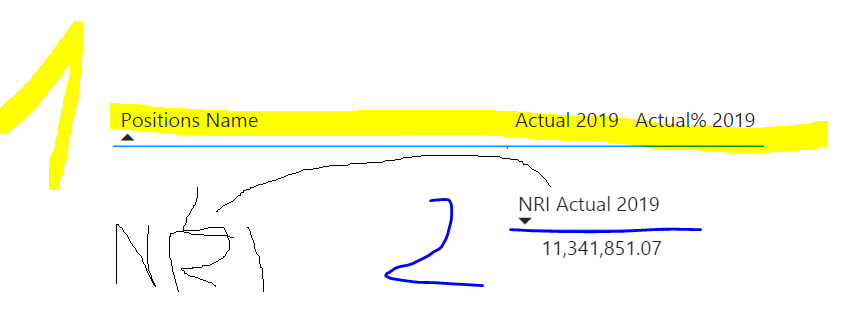
 

Capture1.PNG

Hi, @Anonymous , frankly speaking, I can bearly help troubleshoot such a long DAX expression without any underlying data model. It would be way much easier if you attach a dummy file with some mockup data.


Thanks to the great efforts by MS engineers to simplify syntax of DAX! Most beginners are SUCCESSFULLY MISLED to think that they could easily master DAX; but it turns out that the intricacy of the most frequently used RANKX() is still way beyond their comprehension!

DAX is simple, but NOT EASY!

Helpful resources

Announcements
April Power BI Update Carousel

Power BI Monthly Update - April 2026

Check out the April 2026 Power BI update to learn about new features.

Fabric SQL PBI Data Days

Data Days 2026 coming soon!

Sign up to receive a private message when registration opens and key events begin.

New to Fabric survey Carousel

New to Fabric Survey

If you have recently started exploring Fabric, we'd love to hear how it's going. Your feedback can help with product improvements.

Power BI DataViz World Championships carousel

Power BI DataViz World Championships - June 2026

A new Power BI DataViz World Championship is coming this June! Don't miss out on submitting your entry.