Join us at FabCon Atlanta from March 16 - 20, 2026, for the ultimate Fabric, Power BI, AI and SQL community-led event. Save $200 with code FABCOMM.
Register now!Vote for your favorite vizzies from the Power BI Dataviz World Championship submissions. Vote now!
Hi Everyone,
Can you please help with Dax, I am using a Live connection and I have to Write Dax measure for the Actuals
For Fiscal month.
I want the output like this below
Jan = 0%
Feb = 15.3% -18.7% = -3.4%
Mar = 16.1% -15.3% = 0.8%
Thank you
I
Solved! Go to Solution.
Hi Tamerj,
Thanks a lot for the help 🙂 It worked
% Automated Order EU - Previous Month =
VAR CurrentAcual = [% Automated order EU]
VAR PreviousActual =
CALCULATE (
[% Automated order EU],
ALLSELECTED ( 'SM Dim Calendar' ),
'SM Dim Calendar'[Fiscal Month Number]
= MAX ( 'SM Dim Calendar'[Fiscal Month Number] ) - 1
)
RETURN
CurrentAcual - COALESCE ( PreviousActual, CurrentAcual )
Hi @tamerj1 ,
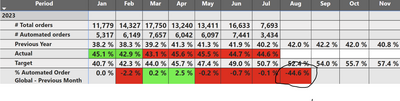
For the below query how to hide the Future months eg : Aug month showing the -44.6% now I want it to show blank
% Automated Order EU - Previous Month =
VAR CurrentAcual = [% Automated order EU]
VAR PreviousActual =
CALCULATE (
[% Automated order EU],
ALLSELECTED ( 'SM Dim Calendar' ),
'SM Dim Calendar'[Fiscal Month Number]
= MAX ( 'SM Dim Calendar'[Fiscal Month Number] ) - 1
)
RETURN
CurrentAcual - COALESCE ( PreviousActual, CurrentAcual )
Thanks in advance
Hi @SupriyaVarun
The assumption is that your date table contains a YearMonthRank column which is a squential number that increases by one every month over the years.
Actual MOM =
VAR CurrentAcual = [Actual]
VAR PreviousActual =
CALCULATE (
[Actual],
ALLSELECTED ( 'Date' ),
'Date'[YearMonthRank]
= MAX ( 'Date'[YearMonthRank] ) - 1
)
RETURN
CurrentAcual - COALESCE ( PreviousActual, CurrentAcual )
Hi Tamerj,
Thanks a lot for the help 🙂 It worked
% Automated Order EU - Previous Month =
VAR CurrentAcual = [% Automated order EU]
VAR PreviousActual =
CALCULATE (
[% Automated order EU],
ALLSELECTED ( 'SM Dim Calendar' ),
'SM Dim Calendar'[Fiscal Month Number]
= MAX ( 'SM Dim Calendar'[Fiscal Month Number] ) - 1
)
RETURN
CurrentAcual - COALESCE ( PreviousActual, CurrentAcual )
Vote for your favorite vizzies from the Power BI World Championship submissions!
If you love stickers, then you will definitely want to check out our Community Sticker Challenge!
Check out the January 2026 Power BI update to learn about new features.
| User | Count |
|---|---|
| 7 | |
| 5 | |
| 3 | |
| 3 | |
| 3 |
| User | Count |
|---|---|
| 17 | |
| 16 | |
| 12 | |
| 5 | |
| 5 |