This time we’re going bigger than ever. Fabric, Power BI, SQL, AI and more. We're covering it all. You won't want to miss it.
Learn moreLevel up your Power BI skills this month - build one visual each week and tell better stories with data! Get started
Hi Everyone,
Can you please help with Dax, I am using a Live connection and I have to Write Dax measure for the Actuals
For Fiscal month.
I want the output like this below
Jan = 0%
Feb = 15.3% -18.7% = -3.4%
Mar = 16.1% -15.3% = 0.8%
Thank you
I
Solved! Go to Solution.
Hi Tamerj,
Thanks a lot for the help 🙂 It worked
% Automated Order EU - Previous Month =
VAR CurrentAcual = [% Automated order EU]
VAR PreviousActual =
CALCULATE (
[% Automated order EU],
ALLSELECTED ( 'SM Dim Calendar' ),
'SM Dim Calendar'[Fiscal Month Number]
= MAX ( 'SM Dim Calendar'[Fiscal Month Number] ) - 1
)
RETURN
CurrentAcual - COALESCE ( PreviousActual, CurrentAcual )
Hi @tamerj1 ,
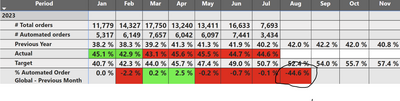
For the below query how to hide the Future months eg : Aug month showing the -44.6% now I want it to show blank
% Automated Order EU - Previous Month =
VAR CurrentAcual = [% Automated order EU]
VAR PreviousActual =
CALCULATE (
[% Automated order EU],
ALLSELECTED ( 'SM Dim Calendar' ),
'SM Dim Calendar'[Fiscal Month Number]
= MAX ( 'SM Dim Calendar'[Fiscal Month Number] ) - 1
)
RETURN
CurrentAcual - COALESCE ( PreviousActual, CurrentAcual )
Thanks in advance
Hi @SupriyaVarun
The assumption is that your date table contains a YearMonthRank column which is a squential number that increases by one every month over the years.
Actual MOM =
VAR CurrentAcual = [Actual]
VAR PreviousActual =
CALCULATE (
[Actual],
ALLSELECTED ( 'Date' ),
'Date'[YearMonthRank]
= MAX ( 'Date'[YearMonthRank] ) - 1
)
RETURN
CurrentAcual - COALESCE ( PreviousActual, CurrentAcual )
Hi Tamerj,
Thanks a lot for the help 🙂 It worked
% Automated Order EU - Previous Month =
VAR CurrentAcual = [% Automated order EU]
VAR PreviousActual =
CALCULATE (
[% Automated order EU],
ALLSELECTED ( 'SM Dim Calendar' ),
'SM Dim Calendar'[Fiscal Month Number]
= MAX ( 'SM Dim Calendar'[Fiscal Month Number] ) - 1
)
RETURN
CurrentAcual - COALESCE ( PreviousActual, CurrentAcual )
Check out the April 2026 Power BI update to learn about new features.
Sign up to receive a private message when registration opens and key events begin.
If you have recently started exploring Fabric, we'd love to hear how it's going. Your feedback can help with product improvements.
| User | Count |
|---|---|
| 4 | |
| 3 | |
| 3 | |
| 2 | |
| 2 |
| User | Count |
|---|---|
| 7 | |
| 6 | |
| 6 | |
| 5 | |
| 4 |