Join us at FabCon Vienna from September 15-18, 2025
The ultimate Fabric, Power BI, SQL, and AI community-led learning event. Save €200 with code FABCOMM.
Get registered- Power BI forums
- Get Help with Power BI
- Desktop
- Service
- Report Server
- Power Query
- Mobile Apps
- Developer
- DAX Commands and Tips
- Custom Visuals Development Discussion
- Health and Life Sciences
- Power BI Spanish forums
- Translated Spanish Desktop
- Training and Consulting
- Instructor Led Training
- Dashboard in a Day for Women, by Women
- Galleries
- Data Stories Gallery
- Themes Gallery
- Contests Gallery
- Quick Measures Gallery
- Notebook Gallery
- Translytical Task Flow Gallery
- TMDL Gallery
- R Script Showcase
- Webinars and Video Gallery
- Ideas
- Custom Visuals Ideas (read-only)
- Issues
- Issues
- Events
- Upcoming Events
Enhance your career with this limited time 50% discount on Fabric and Power BI exams. Ends August 31st. Request your voucher.
- Power BI forums
- Forums
- Get Help with Power BI
- DAX Commands and Tips
- Dates!! Not quite sure how to describe this in one...
- Subscribe to RSS Feed
- Mark Topic as New
- Mark Topic as Read
- Float this Topic for Current User
- Bookmark
- Subscribe
- Printer Friendly Page


- Mark as New
- Bookmark
- Subscribe
- Mute
- Subscribe to RSS Feed
- Permalink
- Report Inappropriate Content
Dates!! Not quite sure how to describe this in one line ....but need help
Hi All
Am newish to Power Bi and Dax - all self taught at moment, although am working through videos and find these forums really helpful.
I have a problem which I just cannot get my head round how to solve.....
I am working with school term dates.
Have a "helper" table which has start and end dates for each term and also a term report date (which is at some point during a term). This also has a "Quarter" allocated to each term in appropriate order, ie Autumn, Spring, Summer.
Have set up a custom date table where I work out what week a date falls into within school year (term starts beginning September); and have defined a Term and Quarter calculated column based on lookup using helper table. So far so good..
I am working with Attendance data which has a column with a statistical meaning of present/absent for each day of each term. I have Many to One relationship between Attendance and Date Table.
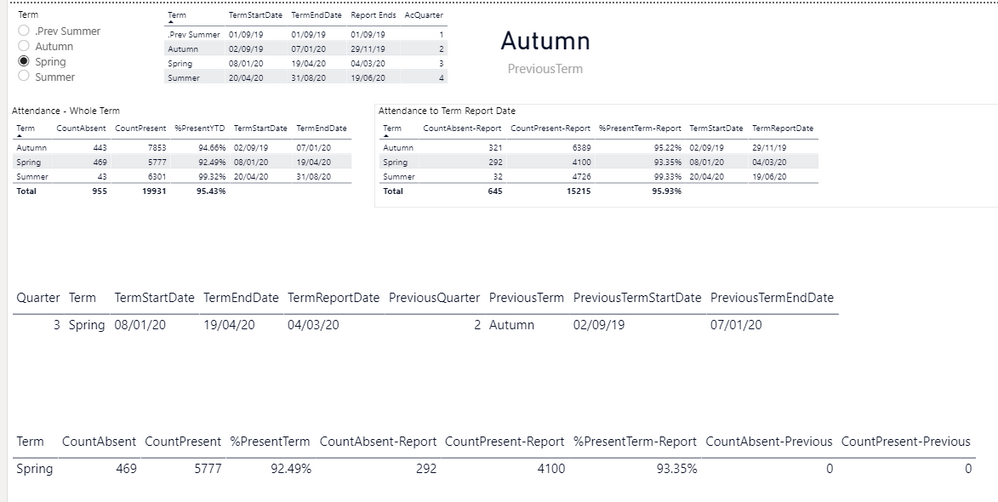
I need to be able to have a table visual which shows a term and count of absent, count of present, % Attendance for term selected from a slicer but also needs to show previous term's data.
I hvae managed to create measures on Date table for:
- selected term (from slicer)
- selected quarter (used in order to allow me to identify previous quarter)
- selected term start date / end date / report date
- previous term
- pervious quarter
- previous term start date / end date / report date
All work perfectly, I am happy to say
I then use these measures in Attendance table to do a count of absent / present and calculate % Attendance
- CountAbsent = calculate(sumx(Attendance,if(Attendance[Statistical meaning]="Absent",1,0)))
- CountPresent = calculate(sumx(Attendance,if(Attendance[Statistical meaning]="Present",1,0)))
- %PresentTerm = calculate([CountPresent]/([CountAbsent]+[CountPresent]),filter(Attendance,Attendance[Mark date]>=[TermStartDate] && Attendance[Mark date]<=[TermEndDate]))
All work perfectly
Also done for the period up to selected term report date:
- CountAbsent-Report = calculate(sumx(Attendance,if(Attendance[Statistical meaning]="Absent" && Attendance[Mark date]<=[TermReportDate],1,0)))
- CountPresent-Report = calculate(sumx(Attendance,if(Attendance[Statistical meaning]="Present" && Attendance[Mark date]<=[TermReportDate],1,0)))
- %PresentTerm-Report = calculate([CountPresent]/([CountAbsent]+[CountPresent]),filter(Attendance,Attendance[Mark date]>=[TermStartDate] && Attendance[Mark date]<=[TermReportDate]))
- CountAbsent-Previous = calculate(sumx(Attendance,if(Attendance[Statistical meaning]="Absent" && Attendance[Mark date]>=[PreviousTermStartDate] && Attendance[Mark date]<=[PreviousTermEndDate],1,0)))
- %PresentPreviousTerm = calculate([CountPresent]/([CountAbsent]+[CountPresent]),filter(Attendance,Attendance[Mark date]>=[PreviousTermStartDate] && Attendance[Mark date]<=[PreviousTermEndDate]))


- Mark as New
- Bookmark
- Subscribe
- Mute
- Subscribe to RSS Feed
- Permalink
- Report Inappropriate Content
I think you should rewrite the measures that are in this form:
CountAbsent-Report = calculate(sumx(Attendance,if(Attendance[Statistical meaning]="Absent" && Attendance[Mark date]<=[TermReportDate],1,0)))
get rid of the calculate round the iterator, in fact get rid of the iterator and the assignment of 1 or 0, just FILTER the table using the clauses you have and COUNTROWS.
In the measure that doesn't work, you will have to debug it to see which clause or condition is causing no rows to be returned. You'll be in a better position if you rewrite according to the advice above.
Reduce the filter clauses until you start to get values returned, then add in another clause. Test to see if the measures e.g. [PreviousTermStartDate] are populated.
Obviously I don't have your data model and data but I'll try and help you debug it if you get stuck. Good luck
- Mark as New
- Bookmark
- Subscribe
- Mute
- Subscribe to RSS Feed
- Permalink
- Report Inappropriate Content
- Mark as New
- Bookmark
- Subscribe
- Mute
- Subscribe to RSS Feed
- Permalink
- Report Inappropriate Content
Hi @HotChilli
Rewrote measure as follows:
| Term | CountAbsent | CountPresent | %PresentYTD | TermStartDate | TermEndDate |
| Autumn | 443 | 7853 | 94.66% | 02/09/2019 | 07/01/2020 |
| Spring | 469 | 5777 | 92.49% | 08/01/2020 | 19/04/2020 |
| Summer | 43 | 6301 | 99.32% | 20/04/2020 | 31/08/2020 |
Here is data up to report date in each term
| Term | CountAbsent-Report | CountPresent-Report | %PresentTerm-Report | TermStartDate | TermReportDate |
| Autumn | 321 | 6389 | 95.22% | 02/09/2019 | 29/11/2019 |
| Spring | 292 | 4100 | 93.35% | 08/01/2020 | 04/03/2020 |
| Summer | 32 | 4726 | 99.33% | 20/04/2020 | 19/06/2020 |
All terms and dates come from Date table and attendance data from Attendance table with many to one relationship based on date field.
I have a slicer based on Term.
If I do a table visual to pull out date information on currently selected term and previously selected term (measures in original post), it works correctly:
| Quarter | Term | TermStartDate | TermEndDate | TermReportDate | PreviousQuarter | PreviousTerm | PreviousTermStartDate | PreviousTermEndDate |
| 4 | Summer | 20/04/2020 | 31/08/2020 | 19/06/2020 | 3 | Spring | 08/01/2020 | 19/04/2020 |
If I have a table visual to pull out attendance data using measures outlined above (with changes you suggested), I get this:
| Term | CountAbsent | CountPresent | %PresentTerm | CountAbsent-Report | CountAbsent-ReportFilter | CountPresent-Report | %PresentTerm-Report | CountAbsent-Previous |
| Summer | 43 | 6301 | 99.32% | 32 | 32 | 4726 | 99.33% |
I want it to put the number of absent from the whole of Spring Term (in first table above) - so figure for CountAbsent-Previous should be 469.
Happy to share file but not sure of best way to do that...
- Mark as New
- Bookmark
- Subscribe
- Mute
- Subscribe to RSS Feed
- Permalink
- Report Inappropriate Content
Post your pbix on a 3rd party site that you trust e.g. box and i'll try and look at it this weekend.
On the re-written measures - they are still overly complex. You can combine the filter clauses rather than sending 3 versions of the filtered table as table filters.
- Mark as New
- Bookmark
- Subscribe
- Mute
- Subscribe to RSS Feed
- Permalink
- Report Inappropriate Content
I have literally just got to the solution with help from previous suggestion from @amitchandak that I have finally got my head around. Is still a bit of a fudge but I can live with it...
In Power Query have created conditional column to give each row that has Absent a value of 1 (will do likewise for present).
In my data table I have a quarter assigned to each term in appropriate order.
Managed to now get an answer with a measure using:
Am gradually getting my head around things (sure I will be back though!!).
This has significantly reduced the work in my previous incarnation which had a lot of "bodges" and extra queries as well as wide tables to get to the same answers!!!!

Helpful resources

Fabric Community Update - July 2025
Find out what's new and trending in the Fabric community.

Power BI Monthly Update - July 2025
Check out the July 2025 Power BI update to learn about new features.

| User | Count |
|---|---|
| 25 | |
| 12 | |
| 8 | |
| 8 | |
| 7 |


| User | Count |
|---|---|
| 28 | |
| 13 | |
| 12 | |
| 12 | |
| 6 |


