Join us at FabCon Atlanta from March 16 - 20, 2026, for the ultimate Fabric, Power BI, AI and SQL community-led event. Save $200 with code FABCOMM.
Register now!The Power BI Data Visualization World Championships is back! Get ahead of the game and start preparing now! Learn more
Hi all,
I am trying to calculate the storage time (in days) for unsold items, historically.
Let's say I bought product A in Jan 2022 and it is still stored today.
DATEDIFF(Sales[PurchaseDate], TODAY(), DAY),) gives me the storage time in days up until today.
I want a bar chart that shows storage time in Feb 2022, March 2022, ... Feb 2023.
I tried replacing TODAY() with MAX(Date[Date]) or SELECTEDVALUE(Date[Date]) with no success.
P.S. Sales table only has PurchaseDate adn SoldDate as date columns.
Some more info, my measure looks like this:
Datediff =
CALCULATE(
if(
SELECTEDVALUE('Date'[MonthEndDate]) >= SELECTEDVALUE(Sales[PurchasedDate]) ,
DATEDIFF(SELECTEDVALUE(Sales[PurchasedDate]), SELECTEDVALUE('Date'[MonthEndDate]) , DAY),
"f"
), USERELATIONSHIP(Sales[PurchasedDate], 'Date'[Date]))
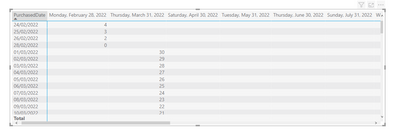
And I get this result:
It only calculates the datediff to the month itself.
I want the difference to all following month ends.
The Power BI Data Visualization World Championships is back! Get ahead of the game and start preparing now!
| User | Count |
|---|---|
| 19 | |
| 14 | |
| 7 | |
| 5 | |
| 5 |
| User | Count |
|---|---|
| 29 | |
| 18 | |
| 17 | |
| 11 | |
| 10 |