FabCon is coming to Atlanta
Join us at FabCon Atlanta from March 16 - 20, 2026, for the ultimate Fabric, Power BI, AI and SQL community-led event. Save $200 with code FABCOMM.
Register now!- Power BI forums
- Get Help with Power BI
- Desktop
- Service
- Report Server
- Power Query
- Mobile Apps
- Developer
- DAX Commands and Tips
- Custom Visuals Development Discussion
- Health and Life Sciences
- Power BI Spanish forums
- Translated Spanish Desktop
- Training and Consulting
- Instructor Led Training
- Dashboard in a Day for Women, by Women
- Galleries
- Data Stories Gallery
- Themes Gallery
- Contests Gallery
- QuickViz Gallery
- Quick Measures Gallery
- Visual Calculations Gallery
- Notebook Gallery
- Translytical Task Flow Gallery
- TMDL Gallery
- R Script Showcase
- Webinars and Video Gallery
- Ideas
- Custom Visuals Ideas (read-only)
- Issues
- Issues
- Events
- Upcoming Events
The Power BI Data Visualization World Championships is back! Get ahead of the game and start preparing now! Learn more
- Power BI forums
- Forums
- Get Help with Power BI
- DAX Commands and Tips
- Re: Data from one or another column but merged
- Subscribe to RSS Feed
- Mark Topic as New
- Mark Topic as Read
- Float this Topic for Current User
- Bookmark
- Subscribe
- Printer Friendly Page


- Mark as New
- Bookmark
- Subscribe
- Mute
- Subscribe to RSS Feed
- Permalink
- Report Inappropriate Content
Data from one or another column but merged
Hi,
I have two columns with the same name (Business Region) in two entities (contact and account)
If it s a contact then Business Region from contact is populated and Business region from Accoutn is blank and the way around.
So we have 3 entities: contact, account and donation.
When the amount from donation is linked to contact (so it's a person who donated) then it is populating the Business Region for contact but is blank for account.
And when the donation is coming from an account (a business/organization etc) the business region is populated for account entity and is blank for contact.
I basically need to get those two fields of Business Region populated in one field.
So as example let s say:
Jon Doe donated 6 euro and he is from London (only contact Business Region field is populated as this is contact)
and Analytics ISO company donated 7 and location is Belfast (only account Business Region field is populated as this is account)
My output should be:
Donor Business Region Amount
Jon Doe London 6
Analytics ISO Belfast 7
Hope now makes sense.
- Mark as New
- Bookmark
- Subscribe
- Mute
- Subscribe to RSS Feed
- Permalink
- Report Inappropriate Content


- Mark as New
- Bookmark
- Subscribe
- Mute
- Subscribe to RSS Feed
- Permalink
- Report Inappropriate Content
Ok. This is because the active relationship has the cardinality that does not help this calculation. I have no idea what columns are involved in which relationship but let me give it a wuick guess. Please try something like.
Business Region =
RELATED ( contact[Business Region] ) &
CALCULATE (
MAX ( account[Business Region] ),
CROSSFILTER ( nfp_donation[column1], account[column1], NONE ),
USERELATIONSHIP ( contact[column2], account[column2] )
)
So CROSSFILTER - NONE to deactivate the active relationship and USERELATIONSHIP to activate the inactive (1 to 1) relationship

- Mark as New
- Bookmark
- Subscribe
- Mute
- Subscribe to RSS Feed
- Permalink
- Report Inappropriate Content


- Mark as New
- Bookmark
- Subscribe
- Mute
- Subscribe to RSS Feed
- Permalink
- Report Inappropriate Content
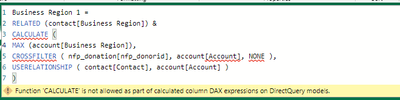
And this is what I get if I create a calculated column on donation
- Mark as New
- Bookmark
- Subscribe
- Mute
- Subscribe to RSS Feed
- Permalink
- Report Inappropriate Content
@adoalan
It won't work this way. Let me know if we can connect via teams or zoom to have a deeper look at it.
- Mark as New
- Bookmark
- Subscribe
- Mute
- Subscribe to RSS Feed
- Permalink
- Report Inappropriate Content
- Mark as New
- Bookmark
- Subscribe
- Mute
- Subscribe to RSS Feed
- Permalink
- Report Inappropriate Content
- Mark as New
- Bookmark
- Subscribe
- Mute
- Subscribe to RSS Feed
- Permalink
- Report Inappropriate Content
- Mark as New
- Bookmark
- Subscribe
- Mute
- Subscribe to RSS Feed
- Permalink
- Report Inappropriate Content
- Mark as New
- Bookmark
- Subscribe
- Mute
- Subscribe to RSS Feed
- Permalink
- Report Inappropriate Content
Yes, How to find you on teams
- Mark as New
- Bookmark
- Subscribe
- Mute
- Subscribe to RSS Feed
- Permalink
- Report Inappropriate Content
- Mark as New
- Bookmark
- Subscribe
- Mute
- Subscribe to RSS Feed
- Permalink
- Report Inappropriate Content
- Mark as New
- Bookmark
- Subscribe
- Mute
- Subscribe to RSS Feed
- Permalink
- Report Inappropriate Content
Hi @adoalan
"If it s a contact then Business Region from contact....." What is "it"?
- Mark as New
- Bookmark
- Subscribe
- Mute
- Subscribe to RSS Feed
- Permalink
- Report Inappropriate Content
@tamerj1Hi,
Sorry let me try again:
So we have 3 entities: contact, account and donation.
When the amount from donation is linked to contact (so it's a person who donated) then it is populating the Business Region for contact but is blank for account.
And when the donation is coming from an account (a business/organization etc) the business region is populated for account entity and is blank for contact.
I basically need to get those two fields of Business Region populated in one field.
So as example let s say:
Jon Doe donated 6 euro and he is from London (only contact Business Region field is populated as this is contact)
and Analytics ISO company donated 7 and location is Belfast (only account Business Region field is populated as this is account)
My output should be:
Donor Business Region Amount
Jon Doe London 6
Analytics ISO Belfast 7
Hope now makes sense.
Many thanks
- Mark as New
- Bookmark
- Subscribe
- Mute
- Subscribe to RSS Feed
- Permalink
- Report Inappropriate Content
Hi @adoalan
as long as you are working at fact table (donation) transaction level then the simplest approach is to create a [Business Region] calculated column in the donation table
Business Region =
RELATED ( account[Business Region] ) & RELATED ( contact[Business Region] )
- Mark as New
- Bookmark
- Subscribe
- Mute
- Subscribe to RSS Feed
- Permalink
- Report Inappropriate Content

@tamerj1HI,
I Doesn t work. I can find the contact table but is not finding the account table.
Any suggestions
Many thanks
- Mark as New
- Bookmark
- Subscribe
- Mute
- Subscribe to RSS Feed
- Permalink
- Report Inappropriate Content
@adoalan
You forgot to close the closing bracket after Business Region. Once added you need also to detele the very last closing bracket at the end of the line
- Mark as New
- Bookmark
- Subscribe
- Mute
- Subscribe to RSS Feed
- Permalink
- Report Inappropriate Content
I tried @tamerj1 and still doesn t work

I checked my relationship and is correct, not sure why is not working
- Mark as New
- Bookmark
- Subscribe
- Mute
- Subscribe to RSS Feed
- Permalink
- Report Inappropriate Content

Helpful resources

Power BI Dataviz World Championships
The Power BI Data Visualization World Championships is back! Get ahead of the game and start preparing now!

Power BI Monthly Update - November 2025
Check out the November 2025 Power BI update to learn about new features.

FabCon Atlanta 2026
Join us at FabCon Atlanta, March 16-20, for the ultimate Fabric, Power BI, AI and SQL community-led event. Save $200 with code FABCOMM.

| User | Count |
|---|---|
| 20 | |
| 10 | |
| 9 | |
| 4 | |
| 4 |


| User | Count |
|---|---|
| 33 | |
| 31 | |
| 19 | |
| 12 | |
| 11 |


