cancel
Showing results for 
Search instead for 
Did you mean: 

The Power BI Data Visualization World Championships is back! Get ahead of the game and start preparing now! Learn more

Reply
sriramk
Helper I
Helper I

DAX for Conditional monitoring

Hello all,


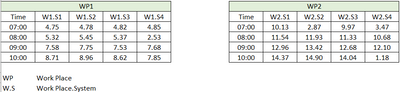
I have a query related to conditional monitoring of values. The data table and expected output are given below. Requesting help to solve. Thank you in advance!


Tables:

sriramk_0-1667115296211.png


QUERY:
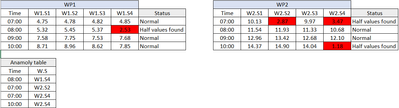
To Find and highlight the W.S where the value is less than half of max value at specific time, add status column and create a anamoly table.


Expected Output:


sriramk_1-1667115523484.png


Sample data here https://docs.google.com/spreadsheets/d/1qaSWtxpLXbsAYSa5TahjJD4Mi4HII4Hv/edit?usp=sharing&ouid=11050...

1 ACCEPTED SOLUTION

Here you are... The change was cosmetic.

View solution in original post

5 REPLIES 5
daXtreme
Solution Sage
Solution Sage

This should not be that hard... Can you please post a link to a file with raw data? I understand that the pictures above show data that's already been pulled out of a model into a visual. Hence my request for raw data. I wouldn't like to waste time to create such data myself by hand. Waste of time and effort. Thanks.

File attached...

Hi,
Thank you for your efforts!
I will put my query again,
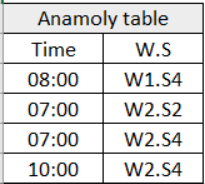
From the image below, value highlight should be based on  less than 50% of Max. value. Here at 08:00, W1.S4 value is 2.53 which is less than 50% of Max value ie., 2.725.

sriramk_0-1667297198587.png


Also, could you please help me with creating Anamoly table (contains time and W.S of highlighted values) similar to below? 

sriramk_1-1667297475107.png


Thank you again for your support!

Here you are... The change was cosmetic.

Helpful resources

Announcements
Power BI DataViz World Championships

Power BI Dataviz World Championships

The Power BI Data Visualization World Championships is back! Get ahead of the game and start preparing now!

November Power BI Update Carousel

Power BI Monthly Update - November 2025

Check out the November 2025 Power BI update to learn about new features.

FabCon Atlanta 2026 carousel

FabCon Atlanta 2026

Join us at FabCon Atlanta, March 16-20, for the ultimate Fabric, Power BI, AI and SQL community-led event. Save $200 with code FABCOMM.