FabCon is coming to Atlanta
Join us at FabCon Atlanta from March 16 - 20, 2026, for the ultimate Fabric, Power BI, AI and SQL community-led event. Save $200 with code FABCOMM.
Register now!- Power BI forums
- Get Help with Power BI
- Desktop
- Service
- Report Server
- Power Query
- Mobile Apps
- Developer
- DAX Commands and Tips
- Custom Visuals Development Discussion
- Health and Life Sciences
- Power BI Spanish forums
- Translated Spanish Desktop
- Training and Consulting
- Instructor Led Training
- Dashboard in a Day for Women, by Women
- Galleries
- Data Stories Gallery
- Themes Gallery
- Contests Gallery
- QuickViz Gallery
- Quick Measures Gallery
- Visual Calculations Gallery
- Notebook Gallery
- Translytical Task Flow Gallery
- TMDL Gallery
- R Script Showcase
- Webinars and Video Gallery
- Ideas
- Custom Visuals Ideas (read-only)
- Issues
- Issues
- Events
- Upcoming Events
The Power BI Data Visualization World Championships is back! Get ahead of the game and start preparing now! Learn more
- Power BI forums
- Forums
- Get Help with Power BI
- DAX Commands and Tips
- Re: DAX count if dates < or >= relating date
- Subscribe to RSS Feed
- Mark Topic as New
- Mark Topic as Read
- Float this Topic for Current User
- Bookmark
- Subscribe
- Printer Friendly Page


- Mark as New
- Bookmark
- Subscribe
- Mute
- Subscribe to RSS Feed
- Permalink
- Report Inappropriate Content
DAX count if dates < or >= relating date
Hi
I have two tables that are related via the Property Ref column.
Table 1 - Property (1 row per property)
| Property Ref | Address | Inspection Date | DAX - repair count < repair date | DAX - repair count >= repair date |
| 18 | 100 Dax Road | 05/07/2021 | 4 | 1 |
| 35 | 45 Query Street | 12/09/2021 | 1 | 6 |
| 57 | 205 Folding Avenue | 05/07/2022 | 5 | 2 |
Table 1 - Repairs (Possibly many repairs per property)
| Job Ref | Property Ref | Trade | Repair Date |
| 13879 | 18 | ELEC | 11/03/2021 |
| 17312 | 18 | PLUM | 13/03/2021 |
| 16407 | 18 | ELEC | 20/03/2021 |
| 19216 | 18 | CARP | 04/07/2021 |
| 16085 | 18 | PLUM | 18/08/2021 |
| 16232 | 35 | CARP | 08/09/2021 |
| 17039 | 35 | ELEC | 12/09/2021 |
| 18691 | 35 | PLUM | 10/11/2021 |
| 18023 | 35 | ELEC | 13/11/2021 |
| 12530 | 35 | PLUM | 08/12/2021 |
| 13056 | 35 | ELEC | 02/02/2022 |
| 19993 | 35 | ELEC | 22/03/2022 |
| 17772 | 57 | ELEC | 24/03/2022 |
| 16143 | 57 | ELEC | 30/03/2022 |
| 15045 | 57 | CARP | 19/05/2022 |
| 14352 | 57 | ELEC | 28/05/2022 |
| 10209 | 57 | CARP | 04/07/2022 |
| 12114 | 57 | CARP | 18/07/2022 |
| 14367 | 57 | CARP | 25/09/2022 |
I require two DAX functions to count the number of repairs for each property ref
DAX FUNCTION 1 - if the Repair date (repairs table) is less than (<) the Inspection date (property table)
DAX FUNCTION 2 if the Repair date (repairs table) is freaterthan or equal (>=) to the Inspection date (property table)
Here is my expected results
Property table
| Property Ref | Address | Inspection Date | DAX - repair count < repair date | DAX - repair count >= repair date |
| 18 | 100 Dax Road | 05/07/2021 | 4 | 1 |
| 35 | 45 Query Street | 12/09/2021 | 1 | 6 |
| 57 | 205 Folding Avenue | 05/07/2022 | 5 | 2 |
thank you
RIchard
Solved! Go to Solution.


- Mark as New
- Bookmark
- Subscribe
- Mute
- Subscribe to RSS Feed
- Permalink
- Report Inappropriate Content
Hi, @cottrera
You can try the following methods.
Column:
repair count < repair date =
CALCULATE (
    COUNT ( Repairs[Property Ref] ),
    FILTER (
        Repairs,
        [Repair Date] < EARLIER ( 'Property'[Inspection Date] )
            && [Property Ref] = EARLIER ( 'Property'[Property Ref] )
    )
)
repair count > repair date =
CALCULATE (
COUNT ( Repairs[Property Ref] ),
FILTER (
Repairs,
[Repair Date] >= EARLIER ( 'Property'[Inspection Date] )
&& [Property Ref] = EARLIER ( 'Property'[Property Ref] )
)
)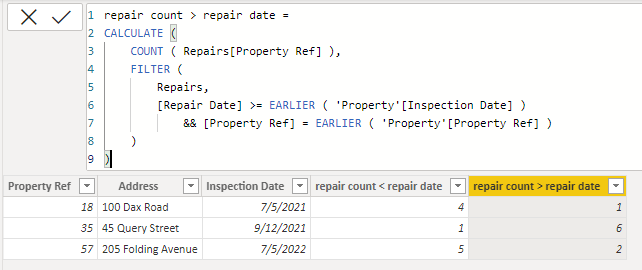
Is this the result you expect?
Best Regards,
Community Support Team _Charlotte
If this post helps, then please consider Accept it as the solution to help the other members find it more quickly.
- Mark as New
- Bookmark
- Subscribe
- Mute
- Subscribe to RSS Feed
- Permalink
- Report Inappropriate Content
Hi, @cottrera
You can try the following methods.
Column:
repair count < repair date =
CALCULATE (
    COUNT ( Repairs[Property Ref] ),
    FILTER (
        Repairs,
        [Repair Date] < EARLIER ( 'Property'[Inspection Date] )
            && [Property Ref] = EARLIER ( 'Property'[Property Ref] )
    )
)
repair count > repair date =
CALCULATE (
COUNT ( Repairs[Property Ref] ),
FILTER (
Repairs,
[Repair Date] >= EARLIER ( 'Property'[Inspection Date] )
&& [Property Ref] = EARLIER ( 'Property'[Property Ref] )
)
)Is this the result you expect?
Best Regards,
Community Support Team _Charlotte
If this post helps, then please consider Accept it as the solution to help the other members find it more quickly.
- Mark as New
- Bookmark
- Subscribe
- Mute
- Subscribe to RSS Feed
- Permalink
- Report Inappropriate Content
Thank you😀
- Mark as New
- Bookmark
- Subscribe
- Mute
- Subscribe to RSS Feed
- Permalink
- Report Inappropriate Content
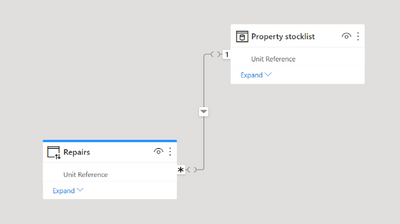
Hi , here is my model
- Mark as New
- Bookmark
- Subscribe
- Mute
- Subscribe to RSS Feed
- Permalink
- Report Inappropriate Content
thank you for reponding so quickly. However I am receiving this error

Richard


- Mark as New
- Bookmark
- Subscribe
- Mute
- Subscribe to RSS Feed
- Permalink
- Report Inappropriate Content
- Mark as New
- Bookmark
- Subscribe
- Mute
- Subscribe to RSS Feed
- Permalink
- Report Inappropriate Content
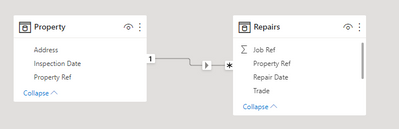
Here's a couple of measures with a similar pattern. The RELATED function allows you to access columns on the 1 side of a relationship while iterating the table on the many side.
DAX - repair count < repair date =
COUNTROWS(
    FILTER(Repairs,
        Repairs[Repair Date] < RELATED('Property'[Inspection Date])
    )
)
[DAX - repair count >= repair date] =
COUNTROWS(
FILTER(Repairs,
Repairs[Repair Date] >= RELATED('Property'[Inspection Date])
)
)

Helpful resources

Power BI Dataviz World Championships
The Power BI Data Visualization World Championships is back! Get ahead of the game and start preparing now!

Power BI Monthly Update - November 2025
Check out the November 2025 Power BI update to learn about new features.

FabCon Atlanta 2026
Join us at FabCon Atlanta, March 16-20, for the ultimate Fabric, Power BI, AI and SQL community-led event. Save $200 with code FABCOMM.

| User | Count |
|---|---|
| 19 | |
| 10 | |
| 9 | |
| 4 | |
| 4 |


| User | Count |
|---|---|
| 34 | |
| 32 | |
| 20 | |
| 12 | |
| 11 |


