cancel
Showing results for 
Search instead for 
Did you mean: 

Next up in the FabCon + SQLCon recap series: The roadmap for Microsoft SQL and Maximizing Developer experiences in Fabric. All sessions are available on-demand after the live show. Register now

Reply
janinw
Helper I
Helper I

DAX TOPN - Get top 5 count from split by values of another column

Dear all,


I am struggling with the following:


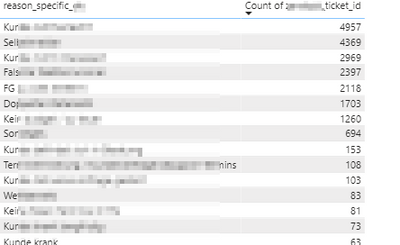
I have a table with several columns: 'date', 'ticket_id', 'reason_group', 'reason_specific'.


What I want:

  • Get the top 5 reasons from the column 'reason_specific'
  • Based on the distinct count of the column 'ticket_id'
  • Then use this top 5 as a filter for a visual


So, the first 5 reasons of the table below should be the filter for a visual.

janinw_0-1607772779472.png


I am getting really lost with the TOPN, CALCULATE, CALCULATETABLE, SUMMARIZE.


Best,
Janine


1 ACCEPTED SOLUTION

Hi all,


I have realised an easy way of getting where I want is by doing the following:

  • Create a measure that calculates the % (or number) for reason_specific:
    perc_tickets = divide(distinctcount([ticket_id]), calculate(distinctcount([ticket_id]), all([reason_specific])))
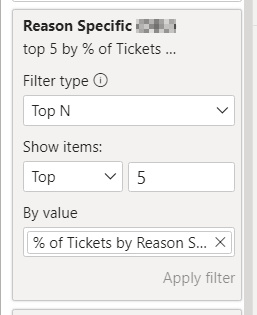
  • Then use the Top N filter type in PowerBI desktop.2020-12-18 09_53_04-B2.02 - MKT - Reasons for not Scheduling an Appointment - Power BI Desktop.png


View solution in original post

5 REPLIES 5
janinw
Helper I
Helper I

Hi @Fowmy 


Please find a dummy dataset as requested here: Dummy Data 


Thanks,

Janine

@janinw 


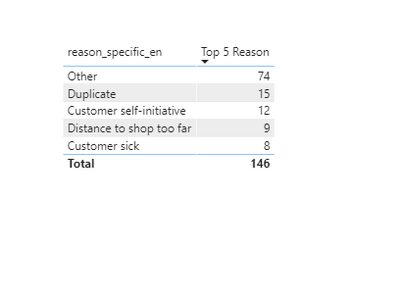
Please find below the measure:


Top 5 Reason = 
var __rank = 
RANKX (
    CALCULATETABLE (
        SUMMARIZE ( Sheet1, Sheet1[reason_specific_en] ),
        ALLSELECTED ( Sheet1)
    ),
    CALCULATE ( DISTINCTCOUNT ( Sheet1[ticket_id] ) ),
    ,
    DESC,
    DENSE
)
return

IF( 
    __rank <= 5 , 
    DISTINCTCOUNT ( Sheet1[ticket_id] )
)

Fowmy_0-1607776798606.png

________________________

If my answer was helpful, please click Accept it as the solution to help other members find it useful

Click on the Thumbs-Up icon if you like this reply 🙂


Website YouTube  LinkedIn


Did I answer your question? Mark my post as a solution! and hit thumbs up


Subscribe and learn Power BI from these videos

Website LinkedIn PBI User Group

@Fowmy  - your solution did not help in using it as a filter for a visual unfortunately. I had done similar things before, but that does not get me to what I want to do with it.

Hi all,


I have realised an easy way of getting where I want is by doing the following:

  • Create a measure that calculates the % (or number) for reason_specific:
    perc_tickets = divide(distinctcount([ticket_id]), calculate(distinctcount([ticket_id]), all([reason_specific])))
  • Then use the Top N filter type in PowerBI desktop.2020-12-18 09_53_04-B2.02 - MKT - Reasons for not Scheduling an Appointment - Power BI Desktop.png


Fowmy
Super User
Super User

@janinw 

Can you share your data as a sample? This will help me to build the right solution as expected. You may create a dummy data set in Excel with the desired output.
You can save your files in OneDrive, Google Drive, or any other cloud sharing platform and share the link here.
____________________________________
How to paste sample data with your question?
How to get your questions answered quickly?

_____________________________________
Did I answer your question? Mark this post as a solution, this will help others!.

Click on the Thumbs-Up icon if you like this reply 🙂

YouTube, LinkedIn

Did I answer your question? Mark my post as a solution! and hit thumbs up


Subscribe and learn Power BI from these videos

Website LinkedIn PBI User Group

Helpful resources

Announcements
New to Fabric survey Carousel

New to Fabric Survey

If you have recently started exploring Fabric, we'd love to hear how it's going. Your feedback can help with product improvements.

Power BI DataViz World Championships carousel

Power BI DataViz World Championships - June 2026

A new Power BI DataViz World Championship is coming this June! Don't miss out on submitting your entry.

Join our Fabric User Panel

Join our Fabric User Panel

Share feedback directly with Fabric product managers, participate in targeted research studies and influence the Fabric roadmap.

March Power BI Update Carousel

Power BI Community Update - March 2026

Check out the March 2026 Power BI update to learn about new features.