Hi friends,
I need the subtotal based on grouping included date filtering applied at first.
Priority: 1: date slicer filtering
2: sort by Ckey, ItemNo, DB_Ind, Entry No
3: group by Ckey, ItemNo
4: sum qty for inventory OUT only
But currently logic only able cater for item 2,3,4.
The first screen showing sample of raw data about overall inventory including inventory IN & inventory OUT.
inventory IN: Entry Type in {0,2,6} inventory OUT: Entry Type in {1,3,5}
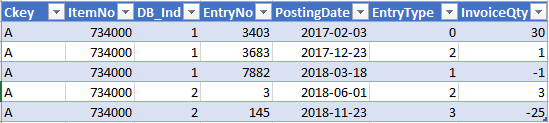 RawSample
Screen below is what currently I can get the correct result by applying below logic.
InventoryOUTQty =
SUMMARIZE(FILTER(V_ItemLedgerEntry,V_ItemLedgerEntry[EntryType] in {1,3,5}),"InventoryOUT",SUM(V_ItemLedgerEntry[InvoiceQty]))
Subtotal_InvOUTQty =
CALCULATE([InventoryOUTQty],ALLEXCEPT(V_ItemLedgerEntry,V_ItemLedgerEntry[CKey],V_ItemLedgerEntry[Item No_]))
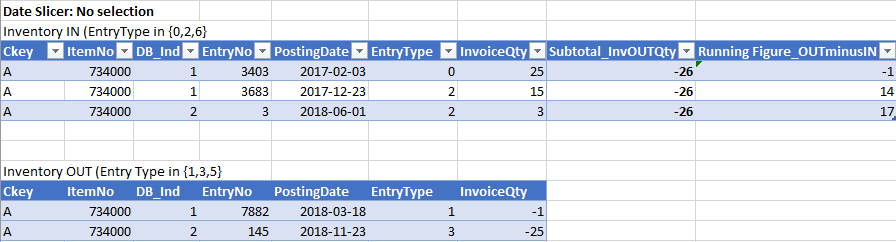 Result1_Default
Btw, I cant get the result below if date slicer is selected, it still showing overall subtotal as -26 instead of -1.
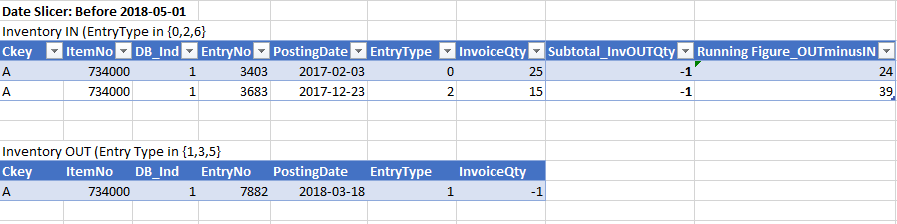 Result_SelectionOnDateSlicer
Thank you.
XioFen


