- Power BI forums
- Updates
- News & Announcements
- Get Help with Power BI
- Desktop
- Service
- Report Server
- Power Query
- Mobile Apps
- Developer
- DAX Commands and Tips
- Custom Visuals Development Discussion
- Health and Life Sciences
- Power BI Spanish forums
- Translated Spanish Desktop
- Power Platform Integration - Better Together!
- Power Platform Integrations (Read-only)
- Power Platform and Dynamics 365 Integrations (Read-only)
- Training and Consulting
- Instructor Led Training
- Dashboard in a Day for Women, by Women
- Galleries
- Community Connections & How-To Videos
- COVID-19 Data Stories Gallery
- Themes Gallery
- Data Stories Gallery
- R Script Showcase
- Webinars and Video Gallery
- Quick Measures Gallery
- 2021 MSBizAppsSummit Gallery
- 2020 MSBizAppsSummit Gallery
- 2019 MSBizAppsSummit Gallery
- Events
- Ideas
- Custom Visuals Ideas
- Issues
- Issues
- Events
- Upcoming Events
- Community Blog
- Power BI Community Blog
- Custom Visuals Community Blog
- Community Support
- Community Accounts & Registration
- Using the Community
- Community Feedback
Earn a 50% discount on the DP-600 certification exam by completing the Fabric 30 Days to Learn It challenge.
- Power BI forums
- Forums
- Get Help with Power BI
- DAX Commands and Tips
- Re: DAX Measure to show the total percentage of op...
- Subscribe to RSS Feed
- Mark Topic as New
- Mark Topic as Read
- Float this Topic for Current User
- Bookmark
- Subscribe
- Printer Friendly Page


- Mark as New
- Bookmark
- Subscribe
- Mute
- Subscribe to RSS Feed
- Permalink
- Report Inappropriate Content
DAX Measure to show the total percentage of opportunities won for the associated lead source?
Hi All,
I have a column of lead sources in my data table and have calculated the percentage of opportunties won with a DAX calculation which results in this table.
| Lead Source | Total % Won |
| A | 22% |
| B | 24% |
| C | 70% |
| D | 13% |
| E | 17% |
How do I create a Dax expression so that this percentage will display in a table against the opportunity like so?
| Opportunity | Lead Source | Lead Source Won |
| Name A | E | 17% |
| Name B | D | 13% |
| Name C | A | 22% |
| Name D | B | 24% |
Opportunity and Lead Source exist in the same data table in power BI
The Total % Won calculation is DIVIDE([Total Opps for Won], [Total Opps]) + 0
Any help is appreciated! Thank you 🙂
Solved! Go to Solution.


- Mark as New
- Bookmark
- Subscribe
- Mute
- Subscribe to RSS Feed
- Permalink
- Report Inappropriate Content
Hi @kajelliott ,
You can try below formula:
M_ =
VAR total_ =
    CALCULATE (
        COUNTROWS ( 'Table' ),
        FILTER ( ALL ( 'Table' ), 'Table'[Load Source] = MAX ( 'Table'[Load Source] ) )
    )
VAR cur_ =
    CALCULATE (
        COUNTROWS ( 'Table' ),
        FILTER (
            ALL ( 'Table' ),
            'Table'[Load Source] = MAX ( 'Table'[Load Source] )
                && 'Table'[Status] = "won"
        )
    )
RETURN
    IF ( ISBLANK ( DIVIDE ( cur_, total_ ) ), 0, DIVIDE ( cur_, total_ ) )
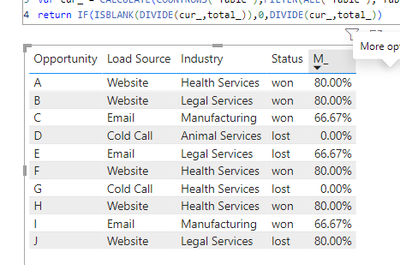
Best Regards,
Adamk Kong
If this post helps, then please consider Accept it as the solution to help the other members find it more quickly.
- Mark as New
- Bookmark
- Subscribe
- Mute
- Subscribe to RSS Feed
- Permalink
- Report Inappropriate Content
Hi @kajelliott ,
Based on your description, you could create a data table similar to the following and then apply this formula.
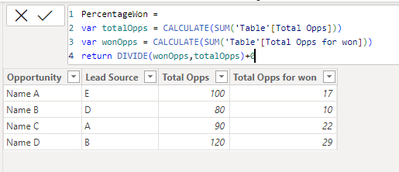
PercentageWon =
VAR totalOpps =
    CALCULATE ( SUM ( 'Table'[Total Opps] ) )
VAR wonOpps =
    CALCULATE ( SUM ( 'Table'[Total Opps for won] ) )
RETURN
    DIVIDE ( wonOpps, totalOpps ) + 0
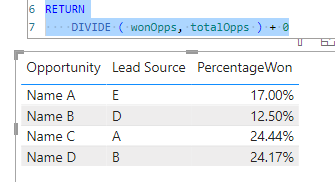
Best Regards,
Adamk Kong
If this post helps, then please consider Accept it as the solution to help the other members find it more quickly.
- Mark as New
- Bookmark
- Subscribe
- Mute
- Subscribe to RSS Feed
- Permalink
- Report Inappropriate Content
Thanks for your suggestion. Both [Total Opps} & [Total Opps for Won] are measures, so it will not allow that for the expression you have written.
Also, I notice that the expression does not reference the Lead Source at all, so i'm not sure how this would work. It looks like the expression would return the percentage won for each opportunity, which will either be 100% or 0% depending on the opportunity.
Let me know what you think.
Thanks!
Kayla
- Mark as New
- Bookmark
- Subscribe
- Mute
- Subscribe to RSS Feed
- Permalink
- Report Inappropriate Content
Hi @kajelliott ,
I don't quite understand what you need, please provide some test data and screenshot information and explain it.
Best Regards,
Adamk Kong
- Mark as New
- Bookmark
- Subscribe
- Mute
- Subscribe to RSS Feed
- Permalink
- Report Inappropriate Content
Sorry, it wont let me upload a pbix file which is frustrating. To give you an idea, my data looks like this:
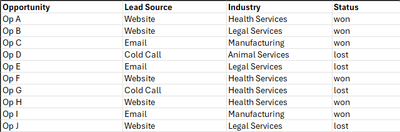
I then create measures to return the percentage of opportunies won which results in this
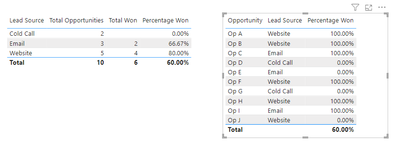
What I need is a measure that returns the percentage of opportunities won for the lead source of each opportunity. Eg, Opportunities with a lead source 'Website' are won 80% of the time.
Example below -
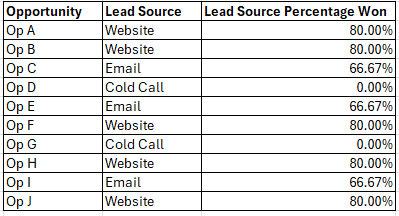
Hopefully this helps!
Thank you.
- Mark as New
- Bookmark
- Subscribe
- Mute
- Subscribe to RSS Feed
- Permalink
- Report Inappropriate Content
Hi @kajelliott ,
You can try below formula:
M_ =
VAR total_ =
    CALCULATE (
        COUNTROWS ( 'Table' ),
        FILTER ( ALL ( 'Table' ), 'Table'[Load Source] = MAX ( 'Table'[Load Source] ) )
    )
VAR cur_ =
    CALCULATE (
        COUNTROWS ( 'Table' ),
        FILTER (
            ALL ( 'Table' ),
            'Table'[Load Source] = MAX ( 'Table'[Load Source] )
                && 'Table'[Status] = "won"
        )
    )
RETURN
    IF ( ISBLANK ( DIVIDE ( cur_, total_ ) ), 0, DIVIDE ( cur_, total_ ) )
Best Regards,
Adamk Kong
If this post helps, then please consider Accept it as the solution to help the other members find it more quickly.
- Mark as New
- Bookmark
- Subscribe
- Mute
- Subscribe to RSS Feed
- Permalink
- Report Inappropriate Content
This is perfect! Thank you so much for your time and effort. It is greatly appreciated 🙂

Helpful resources


| User | Count |
|---|---|
| 53 | |
| 28 | |
| 19 | |
| 18 | |
| 14 |


| User | Count |
|---|---|
| 92 | |
| 86 | |
| 39 | |
| 23 | |
| 22 |


