Join us at FabCon Atlanta from March 16 - 20, 2026, for the ultimate Fabric, Power BI, AI and SQL community-led event. Save $200 with code FABCOMM.
Register now!Get Fabric Certified for FREE during Fabric Data Days. Don't miss your chance! Request now
Hello Team,
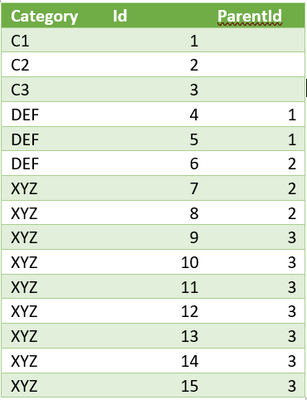
We have a DB table with following fields, that have Parent-Child hierarchy.
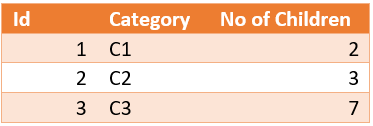
Source TableOur reporting requirement is to come up with following tabular visualization, to display only parent Id Categories (C1,C2,C3) with count of child_id’s associated to my Parent. Something as follows:
Final Output
So, when I select Id -1, the measure should provide the count of child_id’s for it, which is 2 in this case.
I’m SQL guy and very new to DAX, this can be done using a self-join for Id to ParentId in SQL.
Can anyone please provide a DAX expression for the same?
Thanks,
Sundeep
Solved! Go to Solution.
hi @Anonymous
Try this method
First a calculated column
PATH = PATHITEM ( PATH ( TableName[Id], TableName[ParentId] ), 1, INTEGER )Now this MEASURE
No. of Children =
VAR myvalue =
SELECTEDVALUE ( TableName[Id] )
VAR mycategory =
SELECTEDVALUE ( TableName[Category] )
RETURN
CALCULATE (
COUNT ( TableName[PATH] ),
TableName[PATH] = myvalue,
TableName[Category] <> mycategory,
ALL ( TableName )
)
@Anonymous
Please see attached file as well with your sample data and results
hi @Anonymous
Try this method
First a calculated column
PATH = PATHITEM ( PATH ( TableName[Id], TableName[ParentId] ), 1, INTEGER )Now this MEASURE
No. of Children =
VAR myvalue =
SELECTEDVALUE ( TableName[Id] )
VAR mycategory =
SELECTEDVALUE ( TableName[Category] )
RETURN
CALCULATE (
COUNT ( TableName[PATH] ),
TableName[PATH] = myvalue,
TableName[Category] <> mycategory,
ALL ( TableName )
)
Thank you Zubair, this worked. Thanks a bunch for attaching the sample report as well.
Check out the November 2025 Power BI update to learn about new features.
Advance your Data & AI career with 50 days of live learning, contests, hands-on challenges, study groups & certifications and more!
| User | Count |
|---|---|
| 11 | |
| 9 | |
| 9 | |
| 5 | |
| 4 |
| User | Count |
|---|---|
| 27 | |
| 22 | |
| 20 | |
| 17 | |
| 12 |