Join us at FabCon Atlanta from March 16 - 20, 2026, for the ultimate Fabric, Power BI, AI and SQL community-led event. Save $200 with code FABCOMM.
Register now!Get Fabric Certified for FREE during Fabric Data Days. Don't miss your chance! Request now
Hello Members
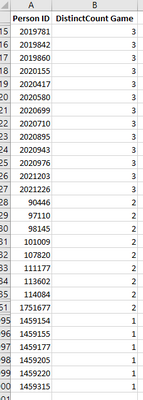
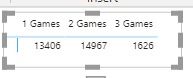
I'm trying to calculate DAX Measure to count how many players played all 3 Games or 2 Games or 1 Games [sample datasets attached]. Please note the Distinct Count Games is DAX formula. Please help me in solving this puzzle. The final out put should look something like this [Below mentioned]. Lastly the column header should like this 1 Game || 2 Game || 3 Game
Solved! Go to Solution.
@Anonymous
Please check the file now:
You can download the file: HERE
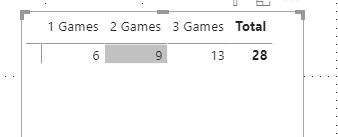
Replace your Distinct Count Games measure with mine.
Game Count Measure =
var _Count = SELECTEDVALUE( 'Game Count'[Count] ) return
SUMX(
VALUES(Games[Person ID]),
IF( [Distinct Count Games] = _Count , 1 )
)
________________________
If my answer was helpful, please consider Accept it as the solution to help the other members find it
Click on the Thumbs-Up icon if you like this reply 🙂
⭕ Subscribe and learn Power BI from these videos
⚪ Website ⚪ LinkedIn ⚪ PBI User Group
@Anonymous
say you have created a dimension table,NewDimTable, which have two columns,. Category column has 1 Game || 2 Game || 3 Game, and Index column has 1,2,3.
then draw the column of Category into column of visual, and put below measure in the value area.
=VAR _games=MAX('NewDimTable'[Index]) RETURN COUNTROWS(FILTER(ALL('FactTable'[Persion ID),[DistinctCount Game]=_games))
@Anonymous
You can create a support table and link on the Distinct Count Column show in Matrix.
You can download the file: HERE
________________________
If my answer was helpful, please consider Accept it as the solution to help the other members find it
Click on the Thumbs-Up icon if you like this reply 🙂
⭕ Subscribe and learn Power BI from these videos
⚪ Website ⚪ LinkedIn ⚪ PBI User Group
thanks @Fowmy
as mentioned the distinct count is DAX measure not a standalone table. so the distinct count of team in my table from my orginal mail arrived from DAX. hope that clarify.
@Anonymous
Please check the file now:
You can download the file: HERE
Replace your Distinct Count Games measure with mine.
Game Count Measure =
var _Count = SELECTEDVALUE( 'Game Count'[Count] ) return
SUMX(
VALUES(Games[Person ID]),
IF( [Distinct Count Games] = _Count , 1 )
)
________________________
If my answer was helpful, please consider Accept it as the solution to help the other members find it
Click on the Thumbs-Up icon if you like this reply 🙂
⭕ Subscribe and learn Power BI from these videos
⚪ Website ⚪ LinkedIn ⚪ PBI User Group
Check out the November 2025 Power BI update to learn about new features.
Advance your Data & AI career with 50 days of live learning, contests, hands-on challenges, study groups & certifications and more!
| User | Count |
|---|---|
| 10 | |
| 10 | |
| 8 | |
| 6 | |
| 6 |
| User | Count |
|---|---|
| 24 | |
| 19 | |
| 18 | |
| 15 | |
| 9 |