Join us at FabCon Atlanta from March 16 - 20, 2026, for the ultimate Fabric, Power BI, AI and SQL community-led event. Save $200 with code FABCOMM.
Register now!The Power BI Data Visualization World Championships is back! Get ahead of the game and start preparing now! Learn more
Hi Community,
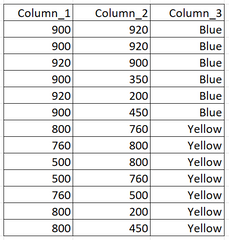
I'm working with a table structured as follows:
I would like to write a DAX measure that returns in any row a unique string of combination of Column_1 and Column_2 values that belongs to both columns.
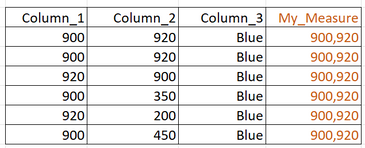
For example, if I put a slicer selector on Blue, the visual should return the following:
Values "200" and "450" are not part of the concatenation because they only appear on Column_2.
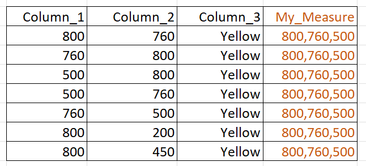
And, if I turn the slicer on Yellow, it shall return:
Again, values "200" and "450" in Column_2 do not become part of the Concatenation, since are not common to both columns.
In other words, I'm trying to figure out how to write a measure that repeat the same combination in any row of the row context [regardless the row] and is filtered by the field context based on Column_3.
I do appreciate your kind suggestions!
Marco.
Solved! Go to Solution.
Hi @marcofalzone,
I'd like to suggest you use INTERSECT and CONCATENATEX functions to get the intersect part of values from two columns.
formula =
CONCATENATEX (
INTERSECT ( VALUES ( Table1[column1] ), VALUES ( Table1[column2] ) ),
[column1],
", "
)
Regards,
Xiaoxin Sheng
Hi Xiaoxin, the proposed formula is perfect, thank you for the time dedicated to my question.
I have a couple of question for you, just for my growth in DAX language:
Is there any way to convert the ouput of your formula in order to return a table as output? It could be useful to use that output as input "IN" syntax (argument of "CALCULATE"), which requires a table as well.
Thank you.
Hi @marcofalzone,
I'd like to suggest you use INTERSECT and CONCATENATEX functions to get the intersect part of values from two columns.
formula =
CONCATENATEX (
INTERSECT ( VALUES ( Table1[column1] ), VALUES ( Table1[column2] ) ),
[column1],
", "
)
Regards,
Xiaoxin Sheng
The Power BI Data Visualization World Championships is back! Get ahead of the game and start preparing now!
Check out the November 2025 Power BI update to learn about new features.
| User | Count |
|---|---|
| 20 | |
| 10 | |
| 9 | |
| 4 | |
| 4 |
| User | Count |
|---|---|
| 33 | |
| 31 | |
| 19 | |
| 12 | |
| 11 |