cancel
Showing results for 
Search instead for 
Did you mean: 

The Power BI Data Visualization World Championships is back! Get ahead of the game and start preparing now! Learn more

Reply
nsaray
Helper II
Helper II

DAX Help - Determine value using occurrence on sub-set of data

I have a set of data which looks like the below and I need to determine whether a transaction is Fully Auto, Partially Auto or Manual.


The rule is:

- If a Transaction has User="Auto" for all 3 statuses, then "Fully Auto"

- If a Transaction has User is not "Auto" for all 3 statuses, then "Manual"

- If a Transaction has User = "Auto" for 1 or 2 statuses, then "Partially Auto"


How could I write this DAX measure?


Data

TransactionStatusUser
Transaction AStatus AAuto
Transaction AStatus BAuto
Transaction AStatus CAuto
Transaction BStatus AAuto
Transaction BStatus BUser 1
Transaction BStatus CUser 2
Transaction CStatus AUser 1
Transaction CStatus BUser 2
Transaction CStatucs CUser 3


Final Output

TransactionOutcome
Transaction AFully Auto
Transaction BPartially Auto
Transaction CManual
2 REPLIES 2
CNENFRNL
Community Champion
Community Champion

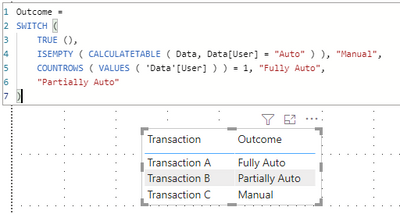
Outcome = 
SWITCH (
    TRUE (),
    ISEMPTY ( CALCULATETABLE ( Data, Data[User] = "Auto" ) ), "Manual",
    COUNTROWS ( VALUES ( 'Data'[User] ) ) = 1, "Fully Auto",
    "Partially Auto"
)

Screenshot 2021-06-13 204119.png


Thanks to the great efforts by MS engineers to simplify syntax of DAX! Most beginners are SUCCESSFULLY MISLED to think that they could easily master DAX; but it turns out that the intricacy of the most frequently used RANKX() is still way beyond their comprehension!

DAX is simple, but NOT EASY!

Jihwan_Kim
Super User
Super User

hi, @nsaray 

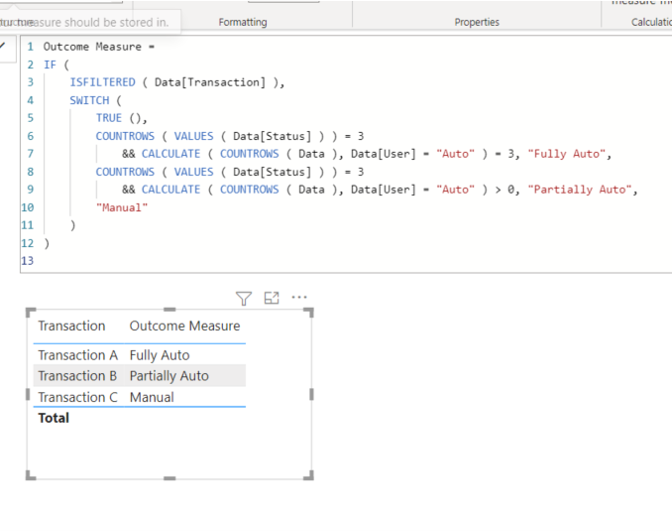
I am not 100% sure if I understood your question correctly, but please check the below picture and the sample pbix file's link down below. It is for creating a measure.


Picture1.png


Outcome Measure =
IF (
ISFILTERED ( Data[Transaction] ),
SWITCH (
TRUE (),
COUNTROWS ( VALUES ( Data[Status] ) ) = 3
&& CALCULATE ( COUNTROWS ( Data ), Data[User] = "Auto" ) = 3, "Fully Auto",
COUNTROWS ( VALUES ( Data[Status] ) ) = 3
&& CALCULATE ( COUNTROWS ( Data ), Data[User] = "Auto" ) > 0, "Partially Auto",
"Manual"
)
)


https://www.dropbox.com/s/kryxg2jq7dsql2d/nsaray.pbix?dl=0 


Hi, My name is Jihwan Kim.


If this post helps, then please consider accept it as the solution to help other members find it faster, and give a big thumbs up.


Linkedin: linkedin.com/in/jihwankim1975/

Twitter: twitter.com/Jihwan_JHKIM


If this post helps, then please consider accepting it as the solution to help other members find it faster, and give a big thumbs up.


Click here to visit my LinkedIn page

Click here to schedule a short Teams meeting to discuss your question.

Helpful resources

Announcements
Power BI DataViz World Championships

Power BI Dataviz World Championships

The Power BI Data Visualization World Championships is back! Get ahead of the game and start preparing now!

November Power BI Update Carousel

Power BI Monthly Update - November 2025

Check out the November 2025 Power BI update to learn about new features.

FabCon Atlanta 2026 carousel

FabCon Atlanta 2026

Join us at FabCon Atlanta, March 16-20, for the ultimate Fabric, Power BI, AI and SQL community-led event. Save $200 with code FABCOMM.