Join us at FabCon Atlanta from March 16 - 20, 2026, for the ultimate Fabric, Power BI, AI and SQL community-led event. Save $200 with code FABCOMM.
Register now!The Power BI Data Visualization World Championships is back! Get ahead of the game and start preparing now! Learn more
Hi there,
Was wondering if someone could help..
I have the following DAX Expression:
_UsageLastXDays =
VAR MinUsageDate =
CALCULATE ( MIN ( Dates[DateISO] ), GameUsage )
RETURN
IF (
MinUsageDate
> TODAY () - NewUsageRange[NewUsageRange Value],
[UsedGamesForBilling]
)
which is looking for the minium date in the context of the "games usage" total and then returning the measure "UsedGamesForBilling" only when the minimum value returned is greater than today - a parameter value. For this exmaple it's set to 10 days.
The result then produces this at customer level (column A). It's evaluating correctly for each row. however as you can see the total is blank, which is expected because it has no context of the row it's evaluating. It's only when I wrap the function above in SUMX (AltUsage column) using the context in the first column that I can produce a total. This is fine at this level.
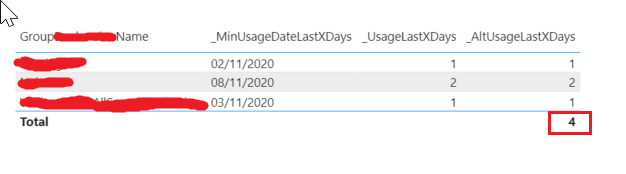
However...
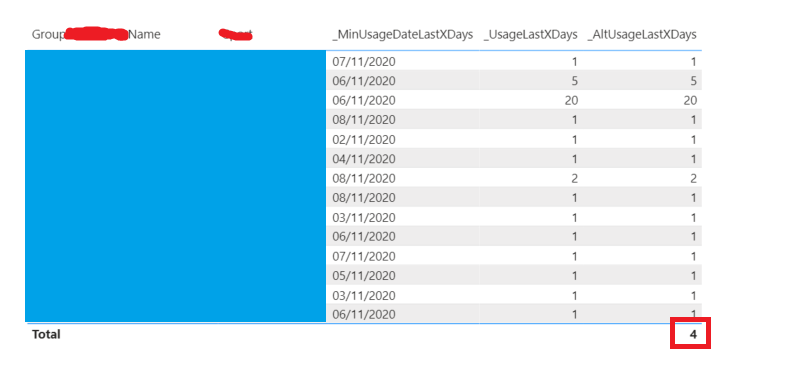
if I expand the context out to two columns, the total will still give me the same result as above. This is also expected because I hard coded the dax to column A only.
What I'd like to know is how I reconfigure the DAX (as outlined above) so that I can make it work, given whatever row context enters my table. the total will sum the visibile rows? e.g. JUST column A = 4. Column A + B VISIBLE = 38
Is this possible somehow dynammically?
Help will be appriciated 🙂
Thanks Pat,
Much appreciated for your swift response.
I implimented this and it is still not producing totals. What am I doing wrong?
_AltUsageLastXDays2 =
VAR Usage = [_UsageLastXDays]
RETURN
IF(ISINSCOPE(B),
sumx(values(A),usage),
sumx(SUMMARIZE(GameUsage,A,B),
Usage)
)
What happens if I want to expand to more than A + B with C being an unknown? Is this possible?
I assume A and B in your expression are actual Table[Column] names. Also, the way you are using the variable will not be calculated dynamically for each row of the virtual table (Values and Summarize). You need to put your [_UsageLastXDays] there instead.
Regards,
Pat
To learn more about Power BI, follow me on Twitter or subscribe on YouTube.
If it is just those two scenarios (A or A+B) then you can use ISINSCOPE on the B column to determine which expression to return. Use your one above for the A only scenario, and the SUMMARIZE equivalent with A and B for that scenario.
Regards,
Pat
To learn more about Power BI, follow me on Twitter or subscribe on YouTube.
The Power BI Data Visualization World Championships is back! Get ahead of the game and start preparing now!
Check out the November 2025 Power BI update to learn about new features.
| User | Count |
|---|---|
| 20 | |
| 11 | |
| 10 | |
| 4 | |
| 4 |
| User | Count |
|---|---|
| 34 | |
| 31 | |
| 19 | |
| 12 | |
| 11 |