Hi everyone,
I need some help solving the following problem:
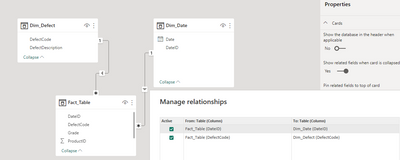
I have 3 tables (1 fact + 2 dimensions) which contain the following columns:
| Fact_Table | | | |
| ProductID | Grade | DefectCode | DateID |
| 1 | B | D1 | 20230101 |
| 1 | B | D4 | 20230101 |
| 1 | C | D4 | 20230101 |
| 2 | B | D1 | 20230102 |
| 3 | B | D2 | 20230105 |
| 3 | C | D3 | 20230105 |
| 3 | C | D4 | 20230105 |
| 4 | B | D2 | 20230106 |
| 5 | B | D1 | 20230114 |
| 5 | C | D1 | 20230114 |
| Dim_Table | |
| DefectCode | DefectDescription |
| D1 | Defect 1 |
| D2 | Defect 2 |
| D3 | Defect 3 |
| D4 | Defect 4 |
The second dimension table is a standard date dimension.
My goal is to build a matrix visual which looks like this:
| Matrix | | | | |
| ProductID | Defect 1 | Defect 2 | Defect 3 | Defect 4 |
| 1 | B | A | A | C |
| 2 | B | A | A | A |
| 3 | A | B | C | C |
| 4 | A | B | A | A |
| 5 | C | A | A | A |
- The column "ProductID" from my fact table is used as "Rows" in my matrix visual
- The column "DefectDescription" from my dimension table is used as a column in my matrix visual
- The column "Grade" should be used as values.
- IMPORTANT: there could be multiple grades for one ProductID and for the same DefectCode. E.g. for ProductID = 1 and DefectCode = D4 there are 2 grades, "B" & "C".
In this case, the "lowest" grade should be selected -> C - If there is no Grade available for a DefectCode, I want to show "A" instead of a blank cell.
In order to achieve this a created the following measure which I use in the matrix visual:
Grade =
VAR result =
CALCULATE (
MAX ( 'Fact_Table'[Grade] ),
FILTER ( ALLSELECTED ( 'Fact_Table' ),
'Fact_Table'[Grade] IN VALUES ( 'Fact_Table'[Grade] )
)
)
RETURN
IF ( result <> BLANK (), result, "A+" )
On the first sight this works pretty well but a problem occures as soon as I want to filter the data inside the matrix using a slicer. (e.g. Date) Date date slicers is using the date dimension with a relationship to my fact table. When I set the date range starting at 20230102, all values for ProductID = 1 will bet set a "A". I know that the visual is supposed the replace not existing values with "A" but in this case, I don't want to show ProductID = 1 at all.
I think that the problem is located in the "ALLSELECTED" part of the FILTER function but I can't figure out what to change in order to get the result needed.
Best regards