Join us at FabCon Atlanta from March 16 - 20, 2026, for the ultimate Fabric, Power BI, AI and SQL community-led event. Save $200 with code FABCOMM.
Register now!The Power BI Data Visualization World Championships is back! It's time to submit your entry. Live now!
Hello,
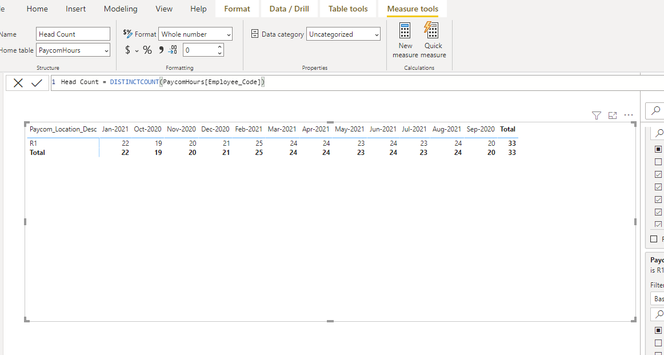
Looking for some help with a DAX formula. If you see the image below I am taking the distinct count of the employee_code field to obtain the number of employees per month. However, I also need to show the last trailing 12 months as an average of the distinct counts. How would I go about doing this in DAX?
I can get a distinct count for the last 12 months using the formula below, but it needs to be an average and not a count.
Head Count LTM = CALCULATE(DISTINCTCOUNT(PaycomHours[Employee_Code]),DATESINPERIOD ('edw dimDate'[Date],MAX ( 'edw dimDate'[Date]),-12,MONTH))
Thank you!!
Solved! Go to Solution.
@PeteDTG , Try a measure like
CALCULATE(averageX(values('edw dimDate'[month year]), calculate(DISTINCTCOUNT(PaycomHours[Employee_Code]))),DATESINPERIOD ('edw dimDate'[Date],MAX ( 'edw dimDate'[Date]),-12,MONTH))
Hey @PeteDTG ,
Please try using this :-
Avg of Head Count LTM = CALCULATE(AVERAGEX(PaycomHours,DISTINCTCOUNT(PaycomHours[Employee_Code])),DATESINPERIOD
('edw dimDate'[Date],MAX ( 'edw dimDate'[Date]),-12,MONTH))
Hey @PeteDTG ,
Please try using this :-
Avg of Head Count LTM = CALCULATE(AVERAGEX(PaycomHours,DISTINCTCOUNT(PaycomHours[Employee_Code])),DATESINPERIOD
('edw dimDate'[Date],MAX ( 'edw dimDate'[Date]),-12,MONTH))
You are awesome, thank you so much! Didn't think to use AVERAGEX! 🙂
@PeteDTG , Try a measure like
CALCULATE(averageX(values('edw dimDate'[month year]), calculate(DISTINCTCOUNT(PaycomHours[Employee_Code]))),DATESINPERIOD ('edw dimDate'[Date],MAX ( 'edw dimDate'[Date]),-12,MONTH))
Thank you so much!! 😁
| User | Count |
|---|---|
| 6 | |
| 5 | |
| 5 | |
| 4 | |
| 3 |
| User | Count |
|---|---|
| 16 | |
| 11 | |
| 9 | |
| 8 | |
| 7 |