This is best Fabric, Power BI, SQL and AI community event. How do we know? The last event sold out! Save €200 with code FABCMTY200.
Register nowThe Fabric community is upgrading! Read all of the details including the timeline and what you can expect. Learn more
Hi,
I was wondering how I would create a measure to exclude the people who leave (have a status of -1) but include everyone with a status of 1 from before but not including the selected date.
I attached a sample power bi file.
https://drive.google.com/file/d/1gyRlYRIZ0KckVOvFBFm6s2tGEq8MvpHM/view?usp=sharing
Thank you!
Solved! Go to Solution.
Hi @Anonymous ,
According to your description, here's my solution.
1.Create a Date table, put this new date column in the slicer.
Date = CALENDAR(DATE(2001,1,1),DATE(2020,1,1))
2.Create a measure.
Check =
IF (
MAX ( 'data'[name] )
IN SELECTCOLUMNS (
FILTER ( ALL ( 'data' ), 'data'[Status] = -1 ),
"Name", 'data'[name]
)
&& MAXX (
FILTER (
ALL ( 'data' ),
'data'[Status] = -1
&& 'data'[name] = MAX ( 'data'[name] )
),
'data'[date]
)
< MAXX ( ALLSELECTED ( 'Date'[Date] ), 'Date'[Date] )
|| MAXX (
FILTER (
ALL ( 'data' ),
'data'[Status] = 1
&& 'data'[name] = MAX ( 'data'[name] )
),
'data'[date]
)
> MAXX ( ALLSELECTED ( 'Date'[Date] ), 'Date'[Date] ),
0,
1
)
Put this measure in the visual filter and let the value is 1, get the correct result.
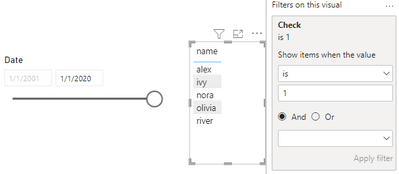
I attach my sample below for reference.
Best Regards,
Community Support Team _ kalyj
If this post helps, then please considerAccept it as the solution to help the other members find it more quickly.
Hi @Anonymous ,
According to your description, here's my solution.
1.Create a Date table, put this new date column in the slicer.
Date = CALENDAR(DATE(2001,1,1),DATE(2020,1,1))
2.Create a measure.
Check =
IF (
MAX ( 'data'[name] )
IN SELECTCOLUMNS (
FILTER ( ALL ( 'data' ), 'data'[Status] = -1 ),
"Name", 'data'[name]
)
&& MAXX (
FILTER (
ALL ( 'data' ),
'data'[Status] = -1
&& 'data'[name] = MAX ( 'data'[name] )
),
'data'[date]
)
< MAXX ( ALLSELECTED ( 'Date'[Date] ), 'Date'[Date] )
|| MAXX (
FILTER (
ALL ( 'data' ),
'data'[Status] = 1
&& 'data'[name] = MAX ( 'data'[name] )
),
'data'[date]
)
> MAXX ( ALLSELECTED ( 'Date'[Date] ), 'Date'[Date] ),
0,
1
)
Put this measure in the visual filter and let the value is 1, get the correct result.
I attach my sample below for reference.
Best Regards,
Community Support Team _ kalyj
If this post helps, then please considerAccept it as the solution to help the other members find it more quickly.
Thank you for providing a sample PBIX.
You might be slightly overcomplicating things.
CalenderMaster = CALENDAR("2017-01-01",MAX('data'[date]))
Don't use auto date/time, you already have your own calendar table.
First you need a calculated table with all names
Names = VALUES(data[name])
then a measure that computes the status for each name and the selected date.
date status =
var d = CALCULATE(max(data[date]),data[date]<=max(CalenderMaster[Date]),data[name]=SELECTEDVALUE(Names[name]))
return calculate(max(data[Status]),data[date]=d,data[name]=SELECTEDVALUE(Names[name]))
and that's it.
NOTE: your calendar definition starts at 2017. Your sample data events start MUCH earlier.
see attached.
Next you need to figure out the status for each of your names at the point in time identified by the date slicer.
Join us in Barcelona for FabCon and SQLCon, the Fabric, Power BI, SQL, and AI community event. Save €200 with code FABCMTY200.
| User | Count |
|---|---|
| 2 | |
| 2 | |
| 2 | |
| 1 | |
| 1 |