Join us at FabCon Atlanta from March 16 - 20, 2026, for the ultimate Fabric, Power BI, AI and SQL community-led event. Save $200 with code FABCOMM.
Register now!The Power BI Data Visualization World Championships is back! Get ahead of the game and start preparing now! Learn more
Hi Guys,
I am a Power BI newbie, so bear with me please.
I have created two summary tables: Monthly Revenues and Monthly Expenses, from two other tables, Revunues and Expenses, which had multiple daily entries.
| Month | Monthly Revenues |
| May | 200 |
| June | 300 |
| July | 500 |
Table - Monthly Revenues
| Month | Monthly Expenses |
| May | 50 |
| June | 75 |
| July | 200 |
Table Monthly Expenses
I am having a challenge create a new table, from the two summary tables, where it would look like this:
| Month | Monthly Revenues | Monthly Expenses |
| May | 200 | 50 |
| June | 300 | 75 |
| July | 500 | 200 |
Table Monthly Margins
I tried several solution posts, from related subject posts, but none quite lead to the desired table above. I believe it is possible with DAX commands...right?
Solved! Go to Solution.
Hi @MeadeMan246 ,
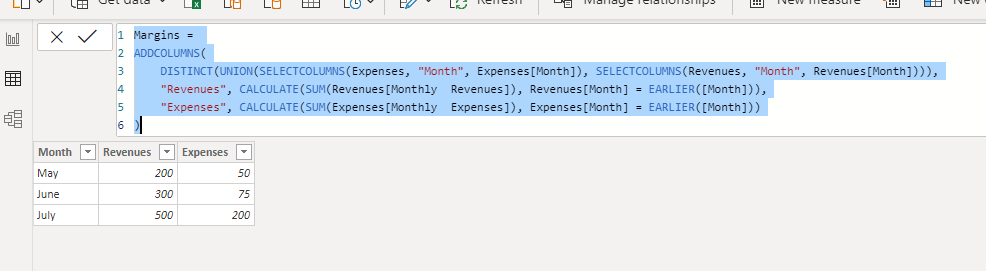
You can create this table with this code:
Margins =
ADDCOLUMNS(
DISTINCT(
UNION(
SELECTCOLUMNS(Expenses, "Month", Expenses[Month]),
SELECTCOLUMNS(Revenues, "Month", Revenues[Month])
)
),
"Revenues", CALCULATE(SUM(Revenues[Monthly Revenues]), Revenues[Month] = EARLIER([Month])),
"Expenses", CALCULATE(SUM(Expenses[Monthly Expenses]), Expenses[Month] = EARLIER([Month]))
)@MeadeMan246 , refer the power query way
https://radacad.com/append-vs-merge-in-power-bi-and-power-query
or
Dax way
https://www.sqlbi.com/articles/from-sql-to-dax-joining-tables/
Hi @MeadeMan246 ,
You can create this table with this code:
Margins =
ADDCOLUMNS(
DISTINCT(
UNION(
SELECTCOLUMNS(Expenses, "Month", Expenses[Month]),
SELECTCOLUMNS(Revenues, "Month", Revenues[Month])
)
),
"Revenues", CALCULATE(SUM(Revenues[Monthly Revenues]), Revenues[Month] = EARLIER([Month])),
"Expenses", CALCULATE(SUM(Expenses[Monthly Expenses]), Expenses[Month] = EARLIER([Month]))
)Hi @ camargos88,
Your suggestion included the summarization of the daily entries for expenses and revenues, which I don't need to do because I have already created those two summary tables (for proofing/sanity checks).
I tried modifying the rest of the ADDCOLUMNS argument, using different functions but with no success. Here is an example using VALUES to populate the cells but got an error.
Hi @MeadeMan246 ,
You have to summarize them again:
Hi camargos88 ,
Following your advice, I got the desired result. Thank you for your assistance and patience.
BR,
The Power BI Data Visualization World Championships is back! Get ahead of the game and start preparing now!
Check out the November 2025 Power BI update to learn about new features.
| User | Count |
|---|---|
| 20 | |
| 11 | |
| 10 | |
| 4 | |
| 4 |
| User | Count |
|---|---|
| 34 | |
| 32 | |
| 19 | |
| 12 | |
| 10 |