cancel
Showing results for 
Search instead for 
Did you mean: 

The Power BI Data Visualization World Championships is back! Get ahead of the game and start preparing now! Learn more

Reply
bob57
Helper IV
Helper IV

Create Calculated Table

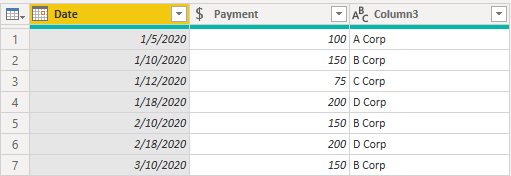
Source data table:

Table1.png

Rows 2 and 4 indicate multiple payments. B Corp to be paid $150 on 1/10, 2/10, and 3/10. D Corp to be paid $200 on 1/18 and 2/18.  I'm looking for a DAX formula to produce the following calculated table from the source table above:

Table2.png

Thank you for your time and assistance.

1 ACCEPTED SOLUTION
Mariusz
Community Champion
Community Champion

Hi @bob57 


You can create a table like below.

Table 2 = 
SELECTCOLUMNS(
    GENERATE(
        'Table',
        VAR __pumnts = 'Table'[No Pymnts]
        RETURN 
            GENERATESERIES( 1, __pumnts, 1 )
    ),
    "Date", 
        VAR __value = [Value] -1 
        VAR __date = 'Table'[Date] 
        VAR __year = YEAR( __date )
        VAR __month = MONTH( __date ) + __value
        VAR __day = DAY( __date )
        RETURN 
            DATE( __year, __month, __day ),
    "Payment", 'Table'[Payment],
    "Vendor", 'Table'[Vendor]
)


Best Regards,
Mariusz

If this post helps, then please consider Accepting it as the solution.


View solution in original post

2 REPLIES 2
Mariusz
Community Champion
Community Champion

Hi @bob57 


You can create a table like below.

Table 2 = 
SELECTCOLUMNS(
    GENERATE(
        'Table',
        VAR __pumnts = 'Table'[No Pymnts]
        RETURN 
            GENERATESERIES( 1, __pumnts, 1 )
    ),
    "Date", 
        VAR __value = [Value] -1 
        VAR __date = 'Table'[Date] 
        VAR __year = YEAR( __date )
        VAR __month = MONTH( __date ) + __value
        VAR __day = DAY( __date )
        RETURN 
            DATE( __year, __month, __day ),
    "Payment", 'Table'[Payment],
    "Vendor", 'Table'[Vendor]
)


Best Regards,
Mariusz

If this post helps, then please consider Accepting it as the solution.


Worked perfectly! Thank you. Now Ineed to learn how it works. Appreciate your effort.

Helpful resources

Announcements
Power BI DataViz World Championships

Power BI Dataviz World Championships

The Power BI Data Visualization World Championships is back! Get ahead of the game and start preparing now!

December 2025 Power BI Update Carousel

Power BI Monthly Update - December 2025

Check out the December 2025 Power BI Holiday Recap!

FabCon Atlanta 2026 carousel

FabCon Atlanta 2026

Join us at FabCon Atlanta, March 16-20, for the ultimate Fabric, Power BI, AI and SQL community-led event. Save $200 with code FABCOMM.