Get certified for free when you join Fabric Data Days 2026 and dive into Fabric, Power BI, SQL, AI, and other essential data skills.
Join nowJuly 7 - July 17 | Round 2 of the Power BI Dataviz World Championships. Don't miss your chance! Learn more
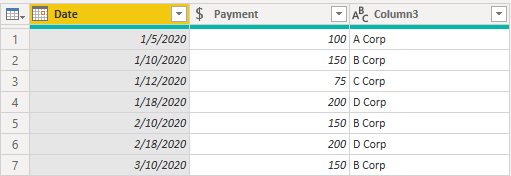
Source data table:
Rows 2 and 4 indicate multiple payments. B Corp to be paid $150 on 1/10, 2/10, and 3/10. D Corp to be paid $200 on 1/18 and 2/18. I'm looking for a DAX formula to produce the following calculated table from the source table above:
Thank you for your time and assistance.
Solved! Go to Solution.
Hi @bob57
You can create a table like below.
Table 2 =
SELECTCOLUMNS(
GENERATE(
'Table',
VAR __pumnts = 'Table'[No Pymnts]
RETURN
GENERATESERIES( 1, __pumnts, 1 )
),
"Date",
VAR __value = [Value] -1
VAR __date = 'Table'[Date]
VAR __year = YEAR( __date )
VAR __month = MONTH( __date ) + __value
VAR __day = DAY( __date )
RETURN
DATE( __year, __month, __day ),
"Payment", 'Table'[Payment],
"Vendor", 'Table'[Vendor]
)
Hi @bob57
You can create a table like below.
Table 2 =
SELECTCOLUMNS(
GENERATE(
'Table',
VAR __pumnts = 'Table'[No Pymnts]
RETURN
GENERATESERIES( 1, __pumnts, 1 )
),
"Date",
VAR __value = [Value] -1
VAR __date = 'Table'[Date]
VAR __year = YEAR( __date )
VAR __month = MONTH( __date ) + __value
VAR __day = DAY( __date )
RETURN
DATE( __year, __month, __day ),
"Payment", 'Table'[Payment],
"Vendor", 'Table'[Vendor]
)
Worked perfectly! Thank you. Now Ineed to learn how it works. Appreciate your effort.
Join us in Barcelona for FabCon and SQLCon, the Fabric, Power BI, SQL, and AI community event. Save €200 with code FABCMTY200.
Join Fabric Data Days 2026: 60 days of free live/on-demand sessions, challenges, study groups, and certification opportunities.
| User | Count |
|---|---|
| 2 | |
| 2 | |
| 1 | |
| 1 | |
| 1 |
| User | Count |
|---|---|
| 4 | |
| 3 | |
| 3 | |
| 3 | |
| 3 |