Join us at FabCon Atlanta from March 16 - 20, 2026, for the ultimate Fabric, Power BI, AI and SQL community-led event. Save $200 with code FABCOMM.
Register now!Learn from the best! Meet the four finalists headed to the FINALS of the Power BI Dataviz World Championships! Register now
Hello,
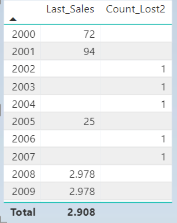
I have created a simple table
where measure
Count_Lost2 = if([Last_Sales]==BLANK(),1)
I want to count this coulmn. Is it not possible to count measures?
Thanks for any help.
Solved! Go to Solution.
You need to create a variable to hold the values at the granularity you want, then you can run SUMX over that. If you wanted it at year level you could use something like
Count of measure =
VAR SummaryTable =
ADDCOLUMNS ( VALUES ( 'Date'[Year] ), "@value", [Measure to count] )
RETURN
SUMX ( SummaryTable, [@value] )
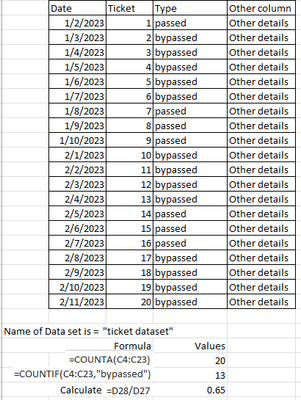
Need some help, Can someone describe how excel counts and calculation can be performed in Power BI? I have a dataset and I think DAX COUNTA or COUNTAX maybe part of the solution. Please provide the format in DAX, it would be much appreciated!
Ohhh, nice! Thanks so much. It works 🤗
You need to create a variable to hold the values at the granularity you want, then you can run SUMX over that. If you wanted it at year level you could use something like
Count of measure =
VAR SummaryTable =
ADDCOLUMNS ( VALUES ( 'Date'[Year] ), "@value", [Measure to count] )
RETURN
SUMX ( SummaryTable, [@value] )
Share feedback directly with Fabric product managers, participate in targeted research studies and influence the Fabric roadmap.
Check out the February 2026 Power BI update to learn about new features.
| User | Count |
|---|---|
| 4 | |
| 3 | |
| 3 | |
| 2 | |
| 2 |
| User | Count |
|---|---|
| 10 | |
| 9 | |
| 6 | |
| 6 | |
| 5 |