Join us at FabCon Atlanta from March 16 - 20, 2026, for the ultimate Fabric, Power BI, AI and SQL community-led event. Save $200 with code FABCOMM.
Register now!Get Fabric Certified for FREE during Fabric Data Days. Don't miss your chance! Request now
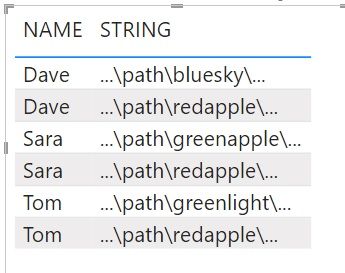
On a previous post I received amazing help in: "Filter single column with multiple conditions (words in a string)"
Solved: Re: Filter single column with multiple conditions ... - Microsoft Power BI Community
Find text that has "red" and "green" in single column
Selector Measure =
VAR __Name = MAX('Table'[NAME])
VAR __Table = SUMMARIZE('Table',[NAME],"__STRING",CONCATENATEX('Table',[STRING]))
VAR __Table1 = ADDCOLUMNS(__Table,"__Red",SEARCH("red",[__STRING],,0),"__Green",SEARCH("green",[__STRING],,0))
VAR __Names = DISTINCT(SELECTCOLUMNS(FILTER(__Table1,[__Red]>0 && [__Green]>0),"__Name",[NAME]))
RETURN
IF(__Name IN __Names,1,0)
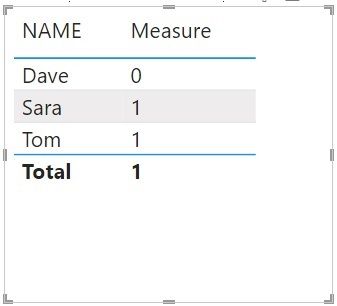
I want to count the results of the Measure and followed this post and few others but could not get it to work.
Solved: Is it possible to count the result of a measure? - Microsoft Power BI Community
As always, any insight would be appreciated!
Solved! Go to Solution.
// You can hide the [Selector Measure]
// from the user's view and use the following
// instead. It'll do what the other does
// and also will summarize correctly unlike the other.
// You can also replace the [Selector Measure]
// with its body inside the new measure and
// then get rid of the old one completely.
// Up to you.
[Your New Measure] =
sumx(
values( 'Table'[Name] ),
[Selector Measure]
)
// You can hide the [Selector Measure]
// from the user's view and use the following
// instead. It'll do what the other does
// and also will summarize correctly unlike the other.
// You can also replace the [Selector Measure]
// with its body inside the new measure and
// then get rid of the old one completely.
// Up to you.
[Your New Measure] =
sumx(
values( 'Table'[Name] ),
[Selector Measure]
)
Thank your help. I appreciate the explanation!
Check out the November 2025 Power BI update to learn about new features.
Advance your Data & AI career with 50 days of live learning, contests, hands-on challenges, study groups & certifications and more!
| User | Count |
|---|---|
| 11 | |
| 10 | |
| 9 | |
| 7 | |
| 6 |
| User | Count |
|---|---|
| 26 | |
| 22 | |
| 19 | |
| 17 | |
| 10 |