Join us at FabCon Atlanta from March 16 - 20, 2026, for the ultimate Fabric, Power BI, AI and SQL community-led event. Save $200 with code FABCOMM.
Register now!The Power BI Data Visualization World Championships is back! Get ahead of the game and start preparing now! Learn more
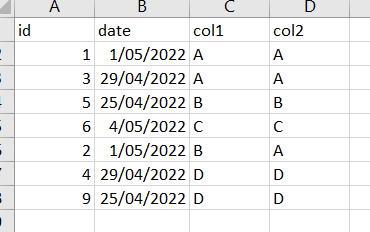
Input
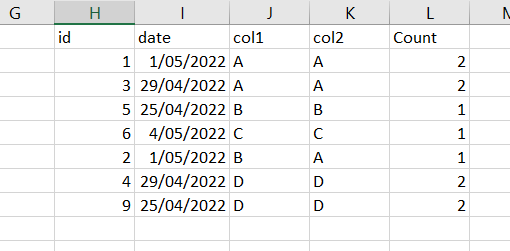
Output
Columns are from different tables and need to get similar output using DAX
Solved! Go to Solution.
Hi @Hems ,
According to your description, here's my solution.
Create a measure.
Count =
CALCULATE (
COUNT ( 'Table'[id] ),
FILTER ( ALL ( 'Table' ), 'Table'[col1] = MAX ( 'Table'[col1] ) ),
FILTER ( ALL ( 'Table2' ), 'Table2'[col2] = MAX ( 'Table2'[col2] ) )
)
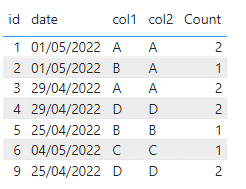
Get the expected result.
I attach my sample below for reference.
Best Regards,
Community Support Team _ kalyj
If this post helps, then please consider Accept it as the solution to help the other members find it more quickly.
Hi @Hems ,
According to your description, here's my solution.
Create a measure.
Count =
CALCULATE (
COUNT ( 'Table'[id] ),
FILTER ( ALL ( 'Table' ), 'Table'[col1] = MAX ( 'Table'[col1] ) ),
FILTER ( ALL ( 'Table2' ), 'Table2'[col2] = MAX ( 'Table2'[col2] ) )
)
Get the expected result.
I attach my sample below for reference.
Best Regards,
Community Support Team _ kalyj
If this post helps, then please consider Accept it as the solution to help the other members find it more quickly.
The Power BI Data Visualization World Championships is back! Get ahead of the game and start preparing now!
| User | Count |
|---|---|
| 19 | |
| 13 | |
| 8 | |
| 4 | |
| 4 |
| User | Count |
|---|---|
| 29 | |
| 19 | |
| 17 | |
| 11 | |
| 10 |