Don't miss your chance to take the Fabric Data Engineer (DP-700) exam on us!
Learn moreNext up in the FabCon + SQLCon recap series: The roadmap for Microsoft SQL and Maximizing Developer experiences in Fabric. All sessions are available on-demand after the live show. Register now
Hi Team ,
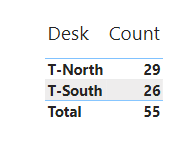
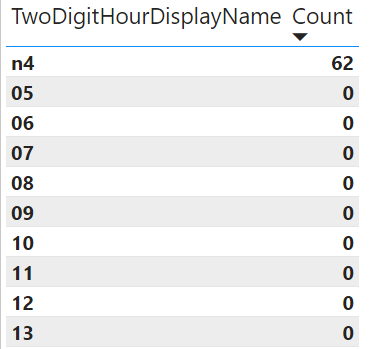
Count is mismatching between Chart1 and chart 2 and count is a measure.
Power BI File Link: https://1drv.ms/u/s!Au-aOkl1BoHumzjPFd4NjEPZHXv2?e=k3esxR
Chart 1: Total Showing 55
Chart 2: Here it is showing 62 but i need to show count as 55
Please let me know anything.
Thanks,
Devansh.
Solved! Go to Solution.
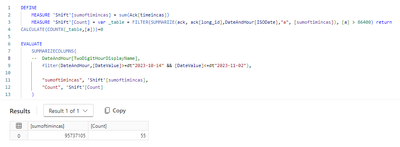
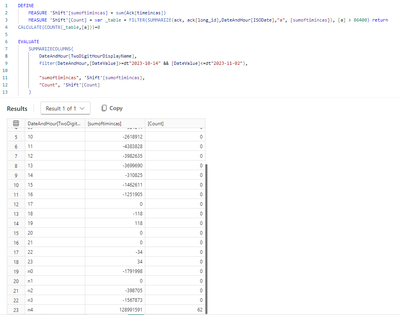
your condition [a]>86400 hits differently depending on how you summarize by long_id, once across all hours, and once by hour.
Hi @lbendlin ,
I am new to power bi. Yes it is behaving differently. I need to show 55 for hourly also . Can you help me on the same?
Thanks,
Devansh.
Why do you need to show 55 for hourly? That would be incorrect unless you have different rules
If you have recently started exploring Fabric, we'd love to hear how it's going. Your feedback can help with product improvements.
A new Power BI DataViz World Championship is coming this June! Don't miss out on submitting your entry.
Share feedback directly with Fabric product managers, participate in targeted research studies and influence the Fabric roadmap.
| User | Count |
|---|---|
| 9 | |
| 6 | |
| 3 | |
| 2 | |
| 1 |
| User | Count |
|---|---|
| 21 | |
| 14 | |
| 9 | |
| 5 | |
| 5 |