Join us at FabCon Atlanta from March 16 - 20, 2026, for the ultimate Fabric, Power BI, AI and SQL community-led event. Save $200 with code FABCOMM.
Register now!Get Fabric Certified for FREE during Fabric Data Days. Don't miss your chance! Request now
Hi Team ,
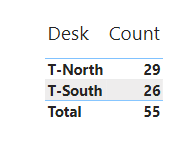
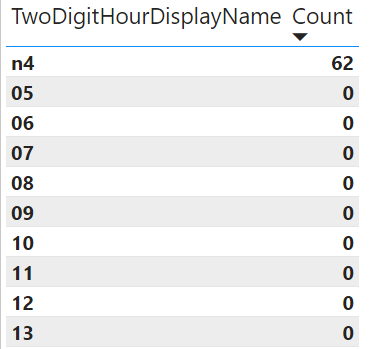
Count is mismatching between Chart1 and chart 2 and count is a measure.
Power BI File Link: https://1drv.ms/u/s!Au-aOkl1BoHumzjPFd4NjEPZHXv2?e=k3esxR
Chart 1: Total Showing 55
Chart 2: Here it is showing 62 but i need to show count as 55
Please let me know anything.
Thanks,
Devansh.
Solved! Go to Solution.
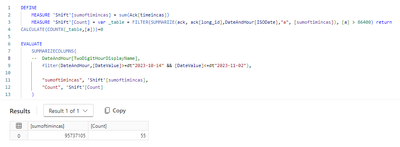
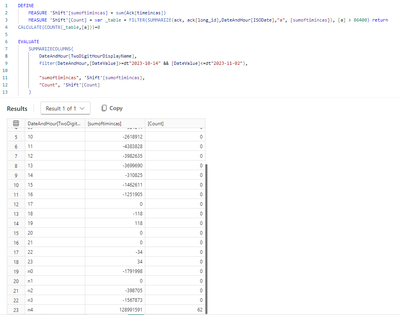
your condition [a]>86400 hits differently depending on how you summarize by long_id, once across all hours, and once by hour.
Hi @lbendlin ,
I am new to power bi. Yes it is behaving differently. I need to show 55 for hourly also . Can you help me on the same?
Thanks,
Devansh.
Why do you need to show 55 for hourly? That would be incorrect unless you have different rules
Check out the November 2025 Power BI update to learn about new features.
Advance your Data & AI career with 50 days of live learning, contests, hands-on challenges, study groups & certifications and more!
| User | Count |
|---|---|
| 10 | |
| 10 | |
| 8 | |
| 6 | |
| 6 |
| User | Count |
|---|---|
| 24 | |
| 19 | |
| 19 | |
| 15 | |
| 9 |