This time we’re going bigger than ever. Fabric, Power BI, SQL, AI and more. We're covering it all. You won't want to miss it.
Learn moreLevel up your Power BI skills this month - build one visual each week and tell better stories with data! Get started
Hi Team ,
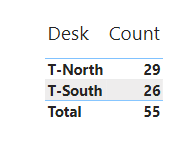
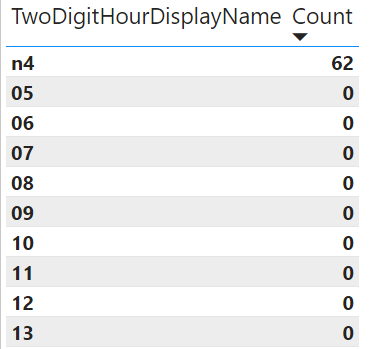
Count is mismatching between Chart1 and chart 2 and count is a measure.
Power BI File Link: https://1drv.ms/u/s!Au-aOkl1BoHumzjPFd4NjEPZHXv2?e=k3esxR
Chart 1: Total Showing 55
Chart 2: Here it is showing 62 but i need to show count as 55
Please let me know anything.
Thanks,
Devansh.
Solved! Go to Solution.
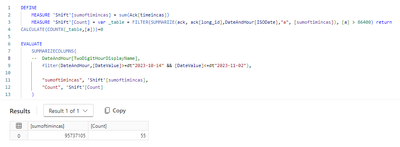
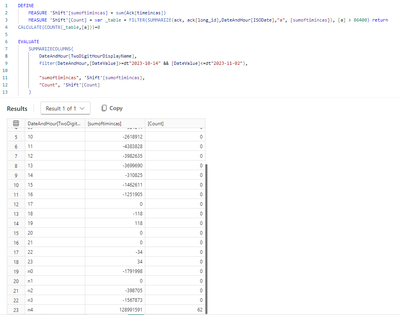
your condition [a]>86400 hits differently depending on how you summarize by long_id, once across all hours, and once by hour.
Hi @lbendlin ,
I am new to power bi. Yes it is behaving differently. I need to show 55 for hourly also . Can you help me on the same?
Thanks,
Devansh.
Why do you need to show 55 for hourly? That would be incorrect unless you have different rules
Check out the April 2026 Power BI update to learn about new features.
Sign up to receive a private message when registration opens and key events begin.
If you have recently started exploring Fabric, we'd love to hear how it's going. Your feedback can help with product improvements.
| User | Count |
|---|---|
| 5 | |
| 4 | |
| 3 | |
| 3 | |
| 3 |
| User | Count |
|---|---|
| 9 | |
| 9 | |
| 7 | |
| 6 | |
| 6 |