cancel
Showing results for 
Search instead for 
Did you mean: 

The Power BI Data Visualization World Championships is back! Get ahead of the game and start preparing now! Learn more

Reply
ElenaCHR
New Member

Convert Excel Formula to DAX - Rolling Attrition

Hi Everyone, 

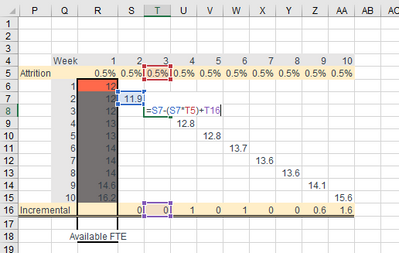
I am struggling trying to Convert the following formula to DAX measure. I have no clue how to do it. 

Column R = Available FTE, but just I need the orange highlighted cell.

Incremental = Actual FTE - Actual FTE Previous Week


ElenaCHR_3-1656614646318.png


Any help please?


2 REPLIES 2
amitchandak
Super User
Super User

@ElenaCHR , Power bi can not use the last row running column in the calculation ( I can not say the new value of the last row, last row value is what, when I begun). So these need to be framed using original values.


example inventory, cumulative has been used


Inventory / OnHand
[Intial Inventory] + CALCULATE(SUM(Table[Ordered]),filter(date,date[date] <=maxx(date,date[date]))) - CALCULATE(SUM(Table[Sold]),filter(date,date[date] <=maxx(date,date[date])))


Share with Power BI Enthusiasts: Full Power BI Video (20 Hours) YouTube
Microsoft Fabric Series 60+ Videos YouTube
Microsoft Fabric Hindi End to End YouTube

@amitchandak thanks for confirming my suspicion. I didn't want to believe it.

Helpful resources

Announcements
Power BI DataViz World Championships

Power BI Dataviz World Championships

The Power BI Data Visualization World Championships is back! Get ahead of the game and start preparing now!

November Power BI Update Carousel

Power BI Monthly Update - November 2025

Check out the November 2025 Power BI update to learn about new features.

FabCon Atlanta 2026 carousel

FabCon Atlanta 2026

Join us at FabCon Atlanta, March 16-20, for the ultimate Fabric, Power BI, AI and SQL community-led event. Save $200 with code FABCOMM.